Resources
Facility Requirements
These documents provide detailed specifications so that you can prepare your facility to receive Carbon products. Share these with your facilities staff as soon as possible to have a smooth installation.
General Lab
Applies to all Carbon products. Includes specifications for air quality, HVAC, UV exposure and more.
Printers
L1
Includes information including crated/uncrated dimensions, weight, clearances, electrical, ventilation and more.
M2
Includes information including crated/uncrated dimensions, weight, clearances, electrical, ventilation and more.
M3
Includes information including crated/uncrated dimensions, weight, clearances, electrical, ventilation and more.
For customers subscribed to the AO Backpack, see additional information about required clearances here.
M3 Max
Includes information including crated/uncrated dimensions, weight, clearances, electrical, ventilation and more.
For customers subscribed to the AO Backpack, see additional information about required clearances here.
Accessories
Smart Part Washer
Includes information including crated/uncrated dimensions, weight, clearances, electrical, ventilation and more.
Heinzen Spinner
Includes specifications including crated dimensions, weight, electrical, ventilation and more.
Dreve PCU 90
Includes specifications for electrical, temperature range, nitrogen requirements and space requirements.
Vac-U-Max Pump Vacuum
Release Film Remover
Carbon Approved Equipment
Includes electrical specifications for chillers and oxygen concentrators.
Checklists to Prepare

When preparing your facility for a new piece of hardware, follow these checklists to ensure you are prepared.
1️⃣ Project Backup
When swapping older printers for a new one, it is a good idea to backup your projects.
Carbon does not store or archive projects. This information is stored on the printer’s onboard server, and cannot be recovered if the server is replaced, reset, or otherwise compromised.
To prevent data loss, we recommend backing up critical projects at least once a month and when swapping printers. Depending on your usage and requirements, more frequent backups may be necessary.
Reference monthly maintenance for your printer for backup instructions. The process is the same for all printers.
2️⃣ Review Maintenance
Reviewing your hardware's maintenance is recommended upfront so you are aware of your responsibilities while operating Carbon machines.
This is especially important if you are changing from one printer type to another. Each piece of hardware contains a unique maintenance schedule.
3️⃣ Hardware Specific Facility Checklist
Use the documents below to track your progress as you prepare your facility. Choose the document that corresponds with your hardware.
M1 and M2
M3
M3 Max
L1
Smart Part Washer
M-Series Accessory Preparation
L1 Accessory Preparation
Lab Design
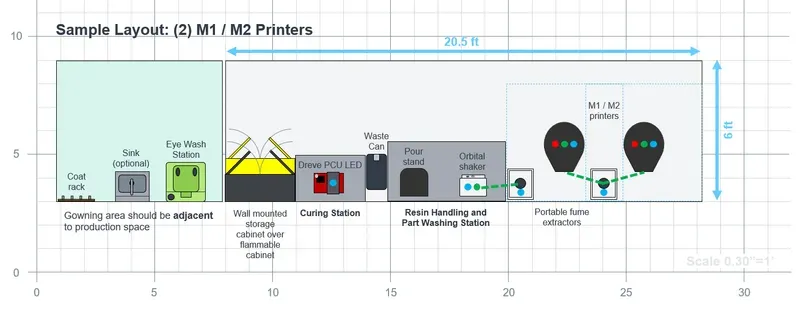
Sample Lab Layouts & Lab Design Tool
Design your lab using this Powerpoint slide deck. Contains scale models of Carbon products and lab accessories.
Networking & Computers
Product Connectivity and Architecture
Information on how to prepare your network for receiving Carbon products.
Network Configuration Device Setup
Carbon’s Network Configuration Device (NCD) will help you configure and test your network connection to Carbon prior to your product’s arrival.
For custom network configurations, also reference:
Computer Specifications
Information on how to prepare your network for receiving Carbon products.
Equipment & Accessories Lists
These handouts list equipment and accessories related to your printer subscription.
- The first page lists the equipment and accessories that are included with your Carbon subscription and Industrial Accessories Package.
- The second page lists required items that are not included with your Carbon subscription or the Industrial Accessories Package. Customers must supply the items listed on page two.
- The third page lists items that Carbon recommends. Customers may purchase these as needed.
For detailed information, customers should consult the following pages:
- Non-dental customers - Equipment & Accessories
- Dental customers - Equipment & Accessories
M1/M2 Printer
M3/M3 Max Printer
L1 Printer
Seismic Anchors
Your facility may need seismic anchors to comply with local safety regulations. If needed, consult the appropriate document(s) below.
M1/M2 Seismic Anchor Installation
M3/M3 Max Seismic Anchor Installation
See Conditional - Install Seismic Restraints in M3/M3 Max Printer pages.
L1 Seismic Restraint Kit Installation
Smart Part Washer Seismic Restraints