---
title: Voids
slug: troubleshooting/voids
description: Discover effective solutions for addressing the "Voids" part defect from Carbon DLS printing. This comprehensive document explains how to identify, troubleshoot, and understand the root causes.
docTags:
createdAt: 2024-06-14T00:56:32.034Z
---
::::VerticalSplit{layout="left"}
:::VerticalSplitItem
**Voids**
Small negative depressions on faces parallel to the platform.
:::
:::VerticalSplitItem

:::
::::
# How to Identify
Voids can be diagnosed as follows:
- Voids occur on surfaces parallel to the platform.
- Voids are usually circular or oblong in shape.
- Voids are most common on large cross sections.
**Resin Starvation** is a defect that can appear similar as it arises from similar circumstances.
::::LinkArray
:::LinkArrayItem{headerType="IMAGE" headerImage="https://api.archbee.com/api/optimize/xcOI3p6O5jO0MVhoHv9rO-dzm4V-a6S48vXgYsUYLoq-20240801-161132.png"}
**Cause** - Inconclusive
:::
:::LinkArrayItem{headerType="IMAGE" headerImage="https://api.archbee.com/api/optimize/xcOI3p6O5jO0MVhoHv9rO-UGZ5xaqQSFhwedbnP3sPw-20240801-161144.jpg"}
**Cause -** **Large Cross Section**
**Solution** - Print Preparation or Part Design
:::
:::LinkArrayItem{headerType="IMAGE" headerImage="https://api.archbee.com/api/optimize/xcOI3p6O5jO0MVhoHv9rO-6oJFY4KZ0kZRBD8vkeo0j-20240801-161159.jpg"}
**Cause** - Inconclusive
:::
:::LinkArrayItem{headerType="IMAGE" headerImage="https://api.archbee.com/api/optimize/xcOI3p6O5jO0MVhoHv9rO-kNe8l-F4JF-y4ay__qcTs-20240801-161209.jpg"}
**Cause** - Inconclusive
:::
::::
# Troubleshooting
:::hint{type="info"}
It is recommended that you review all the possible solutions before taking action to ensure you are pursuing the best course of action.
:::
If the best course of action is not apparent, try the troubleshooting options in the order listed. Refer [here](docId\:pPm8gmeGCY_0fkFwgTCyj) for more tips.
Try the following actions in order.
1. Process, Material, and Hardware Checks
2. Print Preparation or Part Design Adjustments
## Process, Material, and Hardware Checks
If any of these conditions apply to your print, take the corrective action and reprint to see if the problem is resolved.
:::ExpandableHeading
### Resin
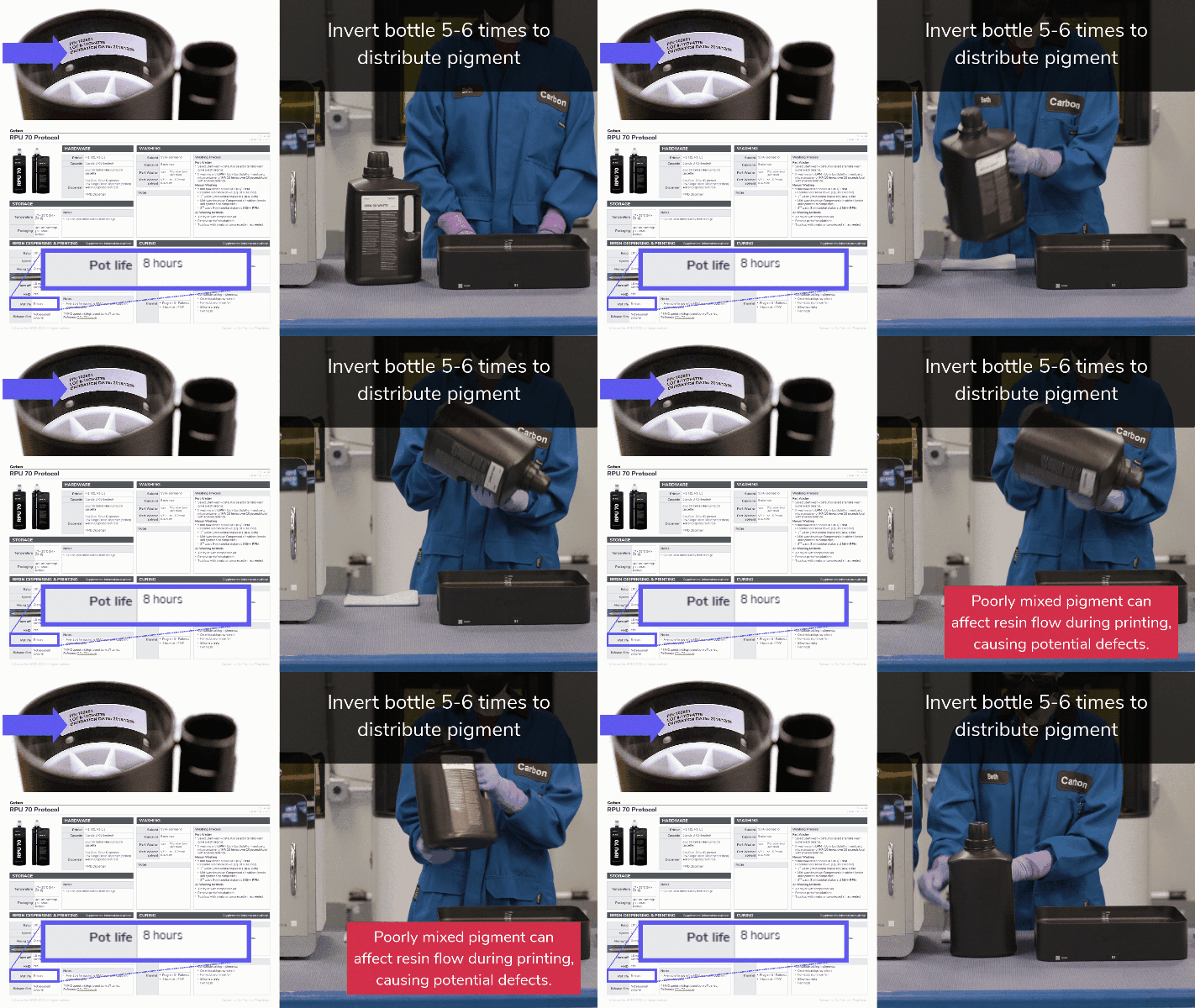
- Check the **expiration date **of your resin lot
- Ensure all **two-part resin **prints are completed within the resin's **pot-life**
- .Ensure that **one-part resins **are **emulsified**. Invert bottle 5-6 times to distribute pigment.
:::
## Print Preparation or Part Design Adjustments
The following solutions will address print or part-related causes of the defects. Choose among the suggested actions below and select the best approach for your application. Usually only one type of adjustment is needed.
:::ExpandableHeading
### Orientation
- **Large Cross Section**
- Orient parts to avoid large cross sections parallel to the platform.
- [EPX 82](docId\:a2ifW3fcyTQ3mSZLy_l-Y)[ ](https://academy.carbon3d.com/learn/course/103/play/2787/course?hash=61de3f4c7b6ba5286e4dcc8e9588d660e80f93c9\&generated_by=13085)should avoid surfaces parallel to the platform that are larger than 10 mm across.
- **Unvented Volume**
- Reorient the part to vent the trapped volume
::Image[]{src="https://api.archbee.com/api/optimize/xcOI3p6O5jO0MVhoHv9rO-NWMD0XTFoFJzj2cy9Sdrg-20240801-162328.png" size="70" width="1680" height="1652" position="center" caption="Supports may be needed with a new orientation." showCaption="true"}
:::
:::ExpandableHeading{isOpen="true"}
### Supports
- **Unvented volume**
- Lift the part above the platform on supports to vent the trapped volume
::Image[]{src="https://res.cloudinary.com/carbon3d/image/upload/v1740527576/Education/Troubleshooting/Part-Defects/Voids/Starvation-supports.png" size="80" width="2000" height="981" position="center" alt="Unvented Volume Supports Fix" showCaption="false"}
:::
:::ExpandableHeading{isOpen="true"}
### Layout
Add more space between parts; increase padding in auto-layout.
::Image[]{src="https://api.archbee.com/api/optimize/xcOI3p6O5jO0MVhoHv9rO-oEoBjH6eGpEuhxVCpkbuR-20240801-162537.png" size="50" width="1680" height="1594" position="center" alt="Layout Padding" showCaption="false"}
:::
:::ExpandableHeading{isOpen="true"}
### Design
- **Unvented Volume**
- Add vent holes in the part, at or near the platform, to vent the trapped volume
Reference [DLS Design Guidelines](docId\:t94PR-A-C0pIhY6LJsWk7) for drain/vent hole guidelines.
::Image[]{src="https://api.archbee.com/api/optimize/xcOI3p6O5jO0MVhoHv9rO-hRnOq3snOPNxzp7rO57yO-20240801-162827.png" size="80" width="1680" height="824" position="center" alt="Unvented Volume Design Fix" showCaption="false"}
:::
:::::ExpandableHeading{isOpen="true"}
### Print Profile
::::VerticalSplit{layout="middle"}
:::VerticalSplitItem
**Default**
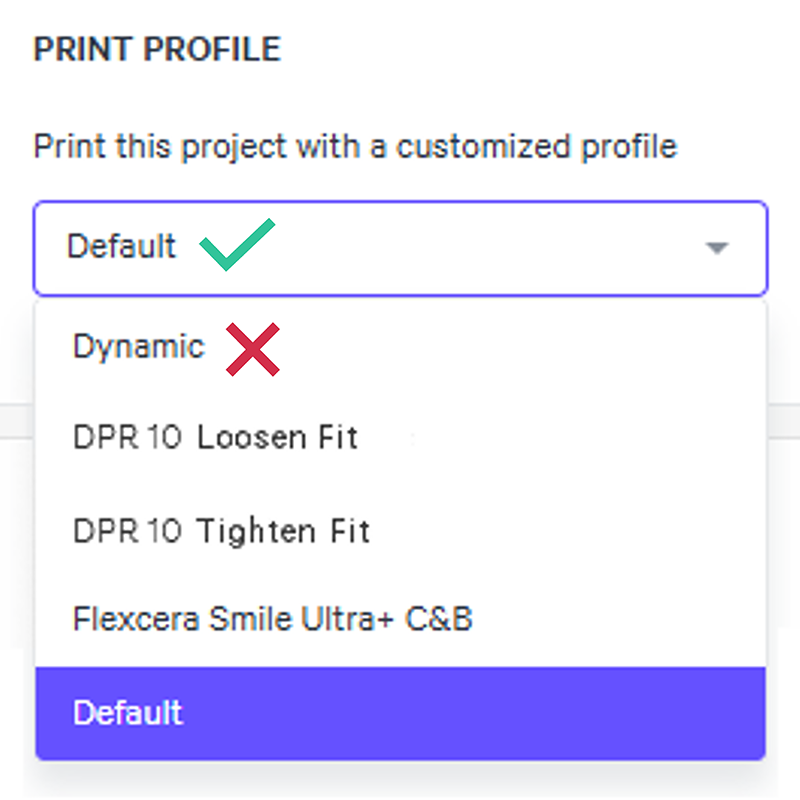
Print using the **Default** print profile instead of Dynamic to slow down the print. Reference [Print Profile](docId\:N9rCrE4j391HMxwvP-udG).
- Dynamic is a tool for **M1 and M2** printers.
- Force feedback (FFB) printers (M3, M3 Max, L1) will see minimal to no difference in print speed with the dynamic print profile, so this troubleshooting option is unlikely to help.
:::
:::VerticalSplitItem
:::
::::
:::::
:::ExpandableHeading
### Print Plan Adjustments
Reference [Print Plan Adjustments](docId\:NxUK0dltz_vemEAU0DIpN) for guidance on the following parameters:
**Pump Up Stage**
- Pump Height Parameters
- Minimum Pump Height
- Distance from Peak Multiplier
- Minimum Distance from Peak
**Settle Up Stage**
- Delay Timing Parameters
- Force Slope Up Settled Threshold
- Minimum Time Force Slope Up Settled
**Other**
- Enhanced EPU Force Feedback Enabled
:::
:::hint{type="info"}
If problems persist, please reach out to [Carbon Support](mailto\:support@carbon3d.com).
:::
# Explanation & Causes
## Explanation
Normal printing requires **resin flow** to reach the center of the part. This is also known as reaching the deepest pixel. **Voids occur when resin does not reach the center.** This can happen for a couple of reasons:
- Resin does not have time to completely cover each layer.
- Resin is more viscous than the print planner expects.
::Image[]{src="https://api.archbee.com/api/optimize/xcOI3p6O5jO0MVhoHv9rO-Ugl0F3ahpjDJO5YgBfAJr-20240802-102802.gif" size="80" width="540" height="540" position="center" showCaption="false"}
## Causes
- Print Preparation or Part Design
- Resin
- Print Plan Adjustments
### Print Preparation or Part Design
::::VerticalSplit{layout="middle"}
:::VerticalSplitItem
How the part is **oriented**, **supported**, or **designed **is causing the defect.
:::
:::VerticalSplitItem

:::
::::
| **Root Issue** | **Problem** | **Why Defect Presents** |
| ------------------- | ----------------------------- | ----------------------------------------------------------------------------------------------------- |
| Large Cross Section | | Resin must travel far to reach the deepest pixel and may not enough time to do so. |
| Unvented Volume | | Unvented volumes can cause restricted resin flow. |
| Layout | Parts are too close together. | If parts are packed too close together, resin flow may be restricted and not reach all parts equally. |
| Print Profile | Print too fast in Dynamic | A shortened print gives less time for resin flow to all areas of the build. *For M1 and M2 printers* |
### Resin
### Resin
::::VerticalSplit{layout="middle"}
:::VerticalSplitItem
The printing material is **expired**, beyond the printing range in its **pot-life**, or has been **improperly mixed**, causing abnormalities in the print.
:::
:::VerticalSplitItem

:::
::::
| **Root Issue** | **Problem** | **Why Defect Presents** |
| -------------- | ---------------------------------- | ----------------------------------------------------------------------------------------------------------------------------- |
| Expired | Resin may not be flowing properly. | If resin is too thick to flow as expected, the print plan may not allow enough time for the resin to reach the deepest pixel. |
### Print Plan Adjustments
### Print Plan Adjustments
::::VerticalSplit{layout="middle"}
:::VerticalSplitItem

:::
:::VerticalSplitItem
[Print Plan Adjustments](docId\:NxUK0dltz_vemEAU0DIpN) adjust the print plan to optimize mid to high volume production and/or address part defects.
In doing so, adjustment may both **prevent or cause defects**. Below are adjustments that can cause this defect.
:::
::::
| **Printing Stage** | **Parameter**
**Type** | **Type of Adjustment** | **Why Defect Presents** |
| ------------------ | --------------------------- | ----------------------------------------- | --------------------------------------------------------------------- |
| 1 Pump Up | Pump Height | **Decrease** | A decrease in the pump height can limit how much resin can flow. |
| 2 Settle Up | Delay Timing | **Decrease** | A shortened settle up stage limits the amount of time resin can flow. |