---
title: Veining
slug: troubleshooting/veining
description: Discover effective solutions for addressing the "Veining" part defect from Carbon DLS printing. This comprehensive document explains how to identify, troubleshoot, and understand the root causes.
docTags:
createdAt: 2024-06-14T00:56:58.905Z
---
**Veining**
Organic ridges on part in the build direction.

# How to Identify
Veining can be diagnosed as follows:
- Ridges on part along the build direction (Z axis).
- Can be wandering or straight.
- May be wavy especially for larger, flat surfaces.
- This is an uncommon defect.
- An extreme form of this defect is called [Caping](docId\:bOSFTxf_qsCXLl9rrYeTn)
::::LinkArray{contentSource="CUSTOM"}
:::LinkArrayItem{headerType="IMAGE" headerImage="https://api.archbee.com/api/optimize/xcOI3p6O5jO0MVhoHv9rO-VrbTVDrbtDYjmiKlbfwvq-20240731-105155.png"}
**Cause** - Inconclusive
:::
:::LinkArrayItem{headerType="IMAGE" headerImage="https://api.archbee.com/api/presign/xcOI3p6O5jO0MVhoHv9rO-xqNF56_WscYgEYg_uQfaQ-20240731-105448.JPG"}
**Cause** - Inconclusive
:::
:::LinkArrayItem{headerType="IMAGE" headerImage="https://api.archbee.com/api/optimize/xcOI3p6O5jO0MVhoHv9rO-jTATvho9UyIH-wr0qftfW-20240731-105535.png"}
**Cause** - Supports too close to surface
:::
::::
# Troubleshooting
:::hint{type="info"}
It is recommended that you review all the possible solutions before taking action to ensure you are pursuing the best course of action.
:::
If the best course of action is not apparent, try the troubleshooting options in the order listed. Refer [here](docId\:pPm8gmeGCY_0fkFwgTCyj) for more tips.
## Print Preparation or Part Design Adjustments
The following solutions will address print or part-related causes of the defects. Choose among the suggested actions below and select the best approach for your application. Usually only one type of adjustment is needed.
:::ExpandableHeading
### Supports
- Adjust supports to allow more space between part and support.
- Adjust density of supports to allow for more resin flow
::Image[]{src="https://api.archbee.com/api/optimize/xcOI3p6O5jO0MVhoHv9rO-HxMr39lq9f439aUrFfmF5-20240731-111217.jpg" size="70" width="1680" height="1313" position="center" showCaption="false"}
:::
:::ExpandableHeading
### Layout
Increase padding to at least **5 mm.**
Reference [Layout](docId\:SJ39gtBagt0cSGVVlCfli)

:::
::::::ExpandableHeading
### Print Profile
:::::VerticalSplit{layout="middle"}
:::VerticalSplitItem
**Small Unvented Volumes**
*Available in software *[v1.46](docId\:M57IWulEuClyGcsBkFE62)
*and higher.*
:::
::::VerticalSplitItem
For use with prints where there is distortion or **extra cured resin** on the surface of critical features **inside holes**.
:::hint{type="info"}
Most commonly seen in analog or anterior **die holes in DPR 10**, but applicable to any application with similarly fitting parts like connectors.
:::
May also help with [Resin Starvation](docId:3EIqqQqCGKwU6QNgdR5Ox) in parts with large window-facing cross sections.
::::
:::::
::::VerticalSplit{layout="middle"}
:::VerticalSplitItem
**Default**
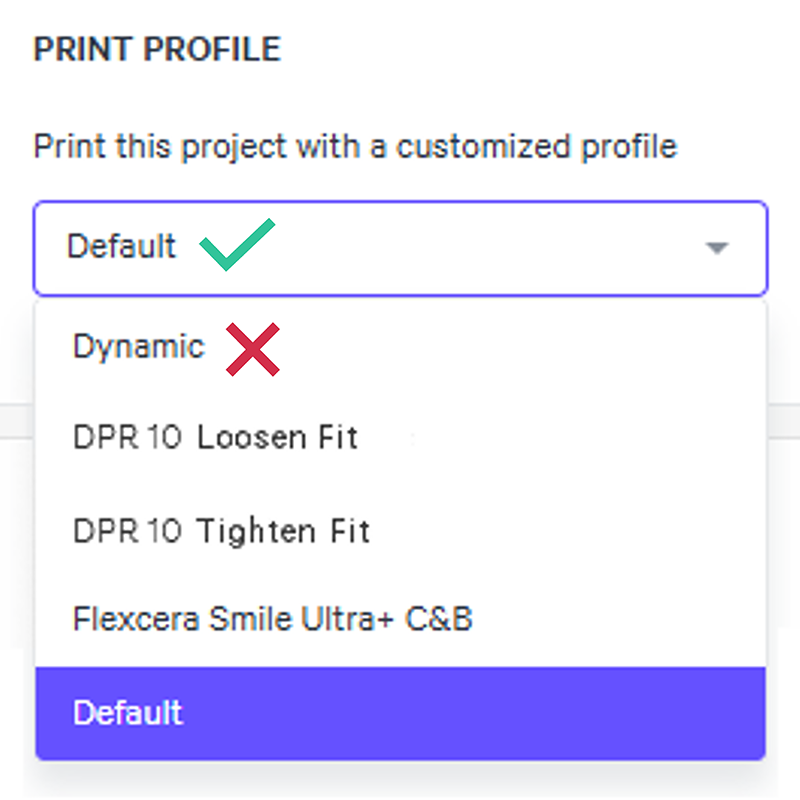
Print using the **Default** print profile instead of Dynamic to slow down the print. Reference [Print Profile](docId\:N9rCrE4j391HMxwvP-udG).
- Dynamic is a tool for **M1 and M2** printers.
- Force feedback (FFB) printers (M3, M3 Max, L1) will see minimal to no difference in print speed with the dynamic print profile, so this troubleshooting option is unlikely to help.
:::
:::VerticalSplitItem
:::
::::
::::::
:::ExpandableHeading
### Print Plan Adjustments
Reference [Print Plan Adjustments](docId\:NxUK0dltz_vemEAU0DIpN) for guidance on the following parameters:
**4 Settle Down Stage**
- Delay Timing Parameters
- Minimum Pre-Exposure Delay
- Minimum Time Force Slope Down Settled
:::
:::hint{type="info"}
If problems persist, please reach out to [Carbon Support](mailto\:support@carbon3d.com).
:::
# Explanation & Causes
## Explanation
- Parts, features and/or supports are too close together restricting resin flow.
- Slow moving resin heats up making it more susceptible to curing from stray UV light.
- This condition is magnified over time as resin heats up over the course of the build.
::Image[]{src="https://api.archbee.com/api/optimize/xcOI3p6O5jO0MVhoHv9rO-TAX_beO-QtncRv6rNZyFh-20240731-112052.jpg" size="80" width="1680" height="945" position="center" caption="Supports are too close to surface" showCaption="true"}
## Causes
- Print Preparation or Part Design
- Print Plan Adjustments
### Print Preparation or Part Design
::::VerticalSplit{layout="middle"}
:::VerticalSplitItem
How the part is **oriented**, **supported**, or **designed **is causing the defect.
:::
:::VerticalSplitItem

:::
::::
| **Root Issue** | **Problem** | **Why Defect Presents** |
| -------------- | --------------------------- | ----------------------------------------------------------------------------------------------------------------------------- |
| Supports | Over-supported | Parts that are over-supported provide less space for resin to flow properly throughout the build causing light to scatter. |
| Layout | Parts too dense on platform | Padding between parts is to small for resin to flow properly throughout the build causing light to scatter. |
| Print Profile | Print too fast in Dynamic | A shortened print gives less time for resin flow to all areas of the build causing light to scatter. *For M1 and M2 printers* |
### Print Plan Adjustments
::::VerticalSplit{layout="middle"}
:::VerticalSplitItem

:::
:::VerticalSplitItem
[Print Plan Adjustments](docId\:NxUK0dltz_vemEAU0DIpN) adjust the print plan to optimize mid to high volume production and/or address part defects.
In doing so, adjustment may both **prevent or cause defects**. Below are adjustments that can cause this defect.
:::
::::
| **Printing Stage** | **Parameter**
**Type**
| **Type of Adjustment** | **Why Defect Presents** |
| ------------------ | --------------------------------- | ----------------------------------------- | ---------------------------------------------------------------------------------------------------------------- |
| 4 Settle Down | Delay Timing | **Decrease** | A shortened settle down stage gives less time for resin flow to all areas of the build causing light to scatter. |