---
title: Under-Adhesion
slug: troubleshooting/under-adhesion
description: Discover effective solutions for addressing the "Under-Adhesion" part defect from Carbon DLS printing. This comprehensive document explains how to identify, troubleshoot, and understand the root causes.
docTags:
createdAt: 2024-06-14T00:57:43.406Z
---
::::VerticalSplit{layout="left"}
:::VerticalSplitItem
**Under-Adhesion**
A part is partially or completely detached from the platform during printing.
:::
:::VerticalSplitItem
::Image[]{src="https://res.cloudinary.com/carbon3d/image/upload/Education/Troubleshooting/Part-Defects/Under-Adhesion/Under-adhesion-example.png" size="70" width="1080" height="1080" position="center" alt="Under-Adhesion" showCaption="false"}
:::
::::
# How to Identify
Under-adhesion can be diagnosed as follows:
::::VerticalSplit{layout="middle"}
:::VerticalSplitItem
- Part partially detaches from the platform
:::
:::VerticalSplitItem
- Look for areas not connected to the platform
- Look for features not fully resolved at platform-adhered surfaces
:::
::::
***
::::VerticalSplit{layout="middle"}
:::VerticalSplitItem
- Part falls off the platform during printing
:::
:::VerticalSplitItem
- Look for the part in the cassette
- Slices cured after the part fell off the platform will be on the window
:::
::::
***
::::VerticalSplit{layout="middle"}
:::VerticalSplitItem
- Part outline on the platform is incorrect after part removed
:::
:::VerticalSplitItem
::Image[]{src="https://res.cloudinary.com/carbon3d/image/upload/Education/Troubleshooting/Part-Defects/Under-Adhesion/Under-adhesion_Platform-diagnosis.png" size="86" width="1080" height="550" position="center" alt="Part outline incorrect on platform" showCaption="false"}
:::
::::
::::LinkArray{contentSource="CUSTOM"}
:::LinkArrayItem{headerType="IMAGE" headerImage="https://api.archbee.com/api/optimize/dptYqcTHPbVZhe3zuNg4v-gDs3nKTJDqQWVLh6G4W1x-20250222-013932.png"}
**Cause -** **Undercut**
**Solution** - Print Preparation or Part Design
:::
:::LinkArrayItem{headerType="IMAGE" headerImage="https://api.archbee.com/api/optimize/dptYqcTHPbVZhe3zuNg4v-X-MBlXWnUap36lb59SNPb-20250222-013932.png"}
**Cause** - **Unvented volume**
**Solution** - Print Preparation or Part Design
:::
:::LinkArrayItem{headerType="IMAGE" headerImage="https://api.archbee.com/api/optimize/dptYqcTHPbVZhe3zuNg4v-wr2YMevEnoWpb7SundMm5-20250222-013932.png"}
**Cause **- Inconclusive
:::
:::LinkArrayItem{headerType="IMAGE" headerImage="https://api.archbee.com/api/optimize/dptYqcTHPbVZhe3zuNg4v-Hp5KI0y9IdlMuU2_qA_m5-20250222-013932.png"}
**Cause **- Inconclusive
:::
:::LinkArrayItem{headerType="IMAGE" headerImage="https://api.archbee.com/api/optimize/dptYqcTHPbVZhe3zuNg4v-j5mqbyGEOawjs9TWv8Tqg-20250222-013932.png"}
**Cause** - **Asymmetrically oriented part**
**Solution** - Print Preparation or Part Design
:::
:::LinkArrayItem{headerType="IMAGE" headerImage="https://api.archbee.com/api/optimize/dptYqcTHPbVZhe3zuNg4v-lcYcBF3Mud4Ns6MpMpjaN-20250222-013932.png"}
**Cause -** **Small to large cross section later in the print**
**Solution** - Print Preparation or Part Design
:::
:::LinkArrayItem{headerType="IMAGE" headerImage="https://api.archbee.com/api/optimize/dptYqcTHPbVZhe3zuNg4v-xCXwS20-vkvjurjQUk7EB-20250222-013933.png"}
**Cause** - **Unvented volume**
**Solution** - Print Preparation or Part Design
:::
::::
# Troubleshooting
:::hint{type="info"}
It is recommended that you review all the possible solutions before taking action to ensure you are pursuing the best course of action.
:::
If the best course of action is not apparent, try the troubleshooting options in the order listed. Refer [here](docId\:pPm8gmeGCY_0fkFwgTCyj) for more tips.
## Process, Material, and Hardware Checks
If any of these conditions apply to your print, take the corrective action and reprint to see if the problem is resolved.
:::ExpandableHeading
### Slices
- Review the [Project Analysis](docId\:gfR-GoC-Irq_L9_KanC-X) in the Printer UI for **blank slices**.
- If blank slices are present, repair the .stl file in a 3rd party repair program.
- Review the first slice and verify that the part's surface is **fully on the platform**.
- Update the model to have a flat base if that is the intention
- Use the [Snap to Platform](docId\:rMnxtq1NIAHXZOc4bZXWu) feature in Carbon software to ensure that your part is on the platform.

:::
:::ExpandableHeading
### Release Film
Release film reduces adhesion.
If you experience under-adhesion while using release film, try printing the build without film.

:::
:::ExpandableHeading
### Resin
- Check the expiration date of your resin lot.
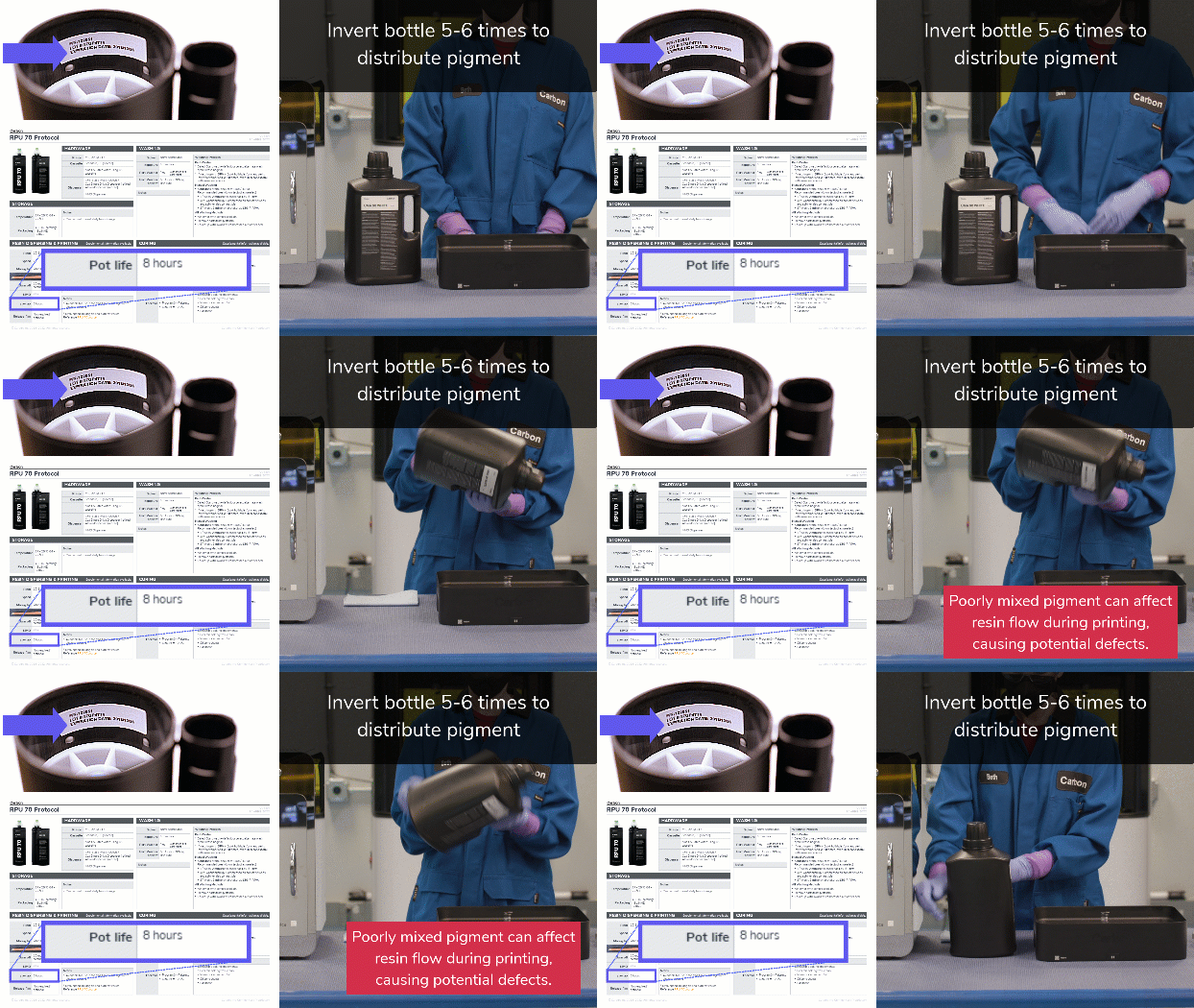
- Ensure all two-part resin prints are completed within the resin's pot-life.
- Ensure that one-part resins are emulsified. Invert bottle 5-6 times to distribute pigment.
:::
:::ExpandableHeading
### Hardware
- Verify the platform and cassette are **cleaned** properly, focusing on the platform surface, window, and all printer connection point
- Verify platform and cassette are **installed** properly
- **M1/M2 Printers **- Clean the platform's **kinematic balls** and clean & lubricate the **kinematic pin mounts **on the platform and cassette per [monthly maintenance](docId:0YWe7YMSIyDn_IMLDVTpn)****** ***DO NOT*** *bake parts on the platform which will cause misalignment of the kinematic balls.*
Reference cleaning and installation instructions for your printer: [M1/M2 Printer](docId:__6PWz7Jx_jb4L5_xWKOJ), [M3/M3 Max Printer](docId:3YymGGIHdvaOwG01EAY6l), [L1 Printer](docId\:oN8OtjugBxOTH6QMqW2oM).

:::
## Diagnostics
If the above checks & actions did not resolve the issue or do not apply to your print, the following diagnostics may further inform what is causing the issue.
:::ExpandableHeading
### Hardware
- Print with a different platform and/or cassette
- If the issue is resolved with another platform or cassette, reach out to [Carbon Support](mailto\:support@carbon3d.com) for assistance with the problematic hardware.
- Run an [Alignment Squares Test](docId\:eneYDJvgK9I1zhog5jjJE).
:::
## Print Preparation or Part Design Adjustments
The following solutions will address print or part-related causes of the defects. Choose among the suggested actions below and select the best approach for your application. Usually only one type of adjustment is needed.
::::ExpandableHeading
### Orientation
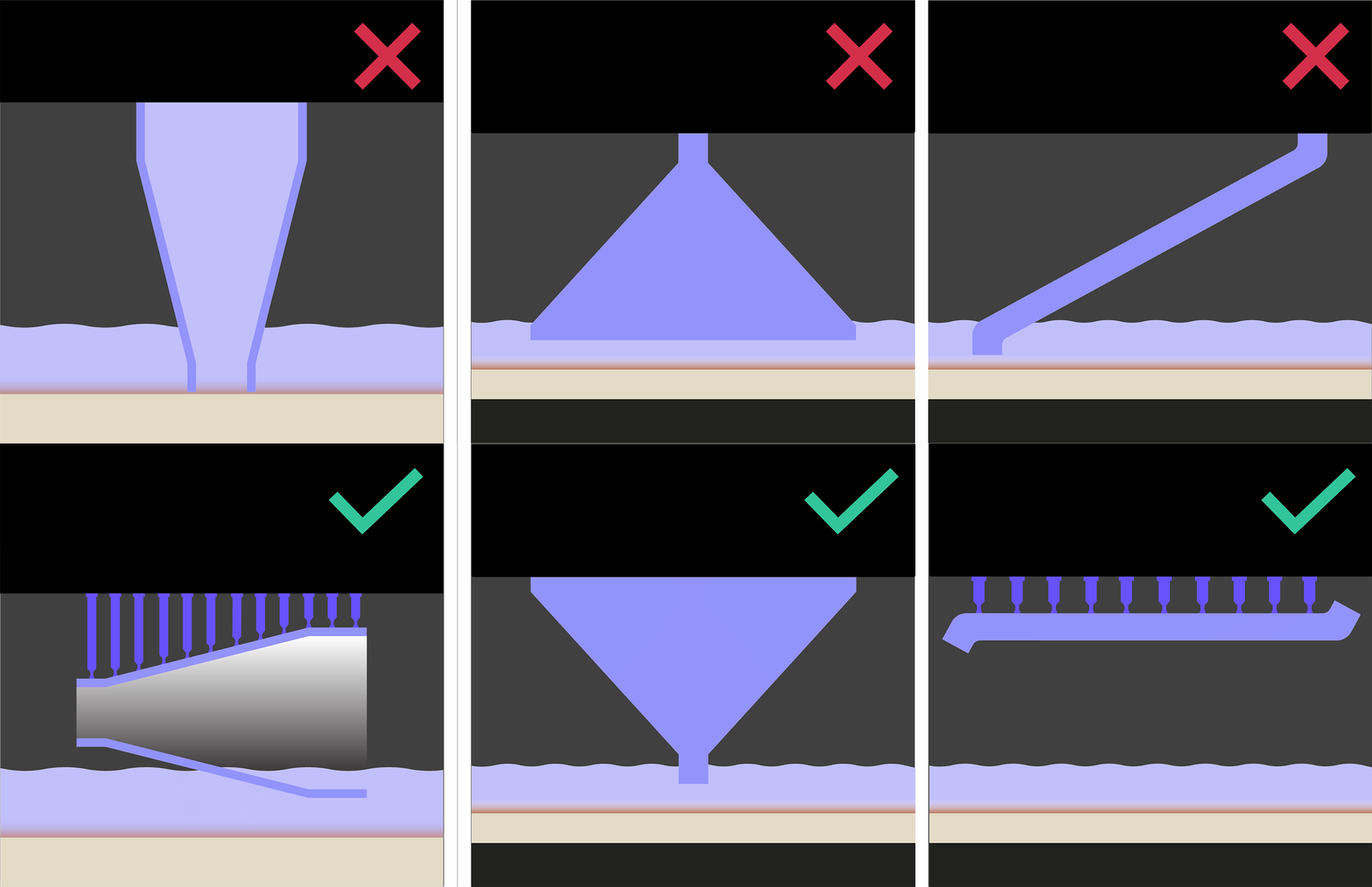
- **Unvented volume**
- Reorient the part to vent the trapped volume
- **Small > large cross section change** or an **asymmetrical orientation**
- Place a larger cross section on the platform, aiming for the average cross section in the print
- Obtain a more uniform cross section throughout the print
- Move the part's center of mass closer to the platform
:::hint{type="warning"}
Supports may be needed with a new orientation.
:::
::::
:::ExpandableHeading
### Supports
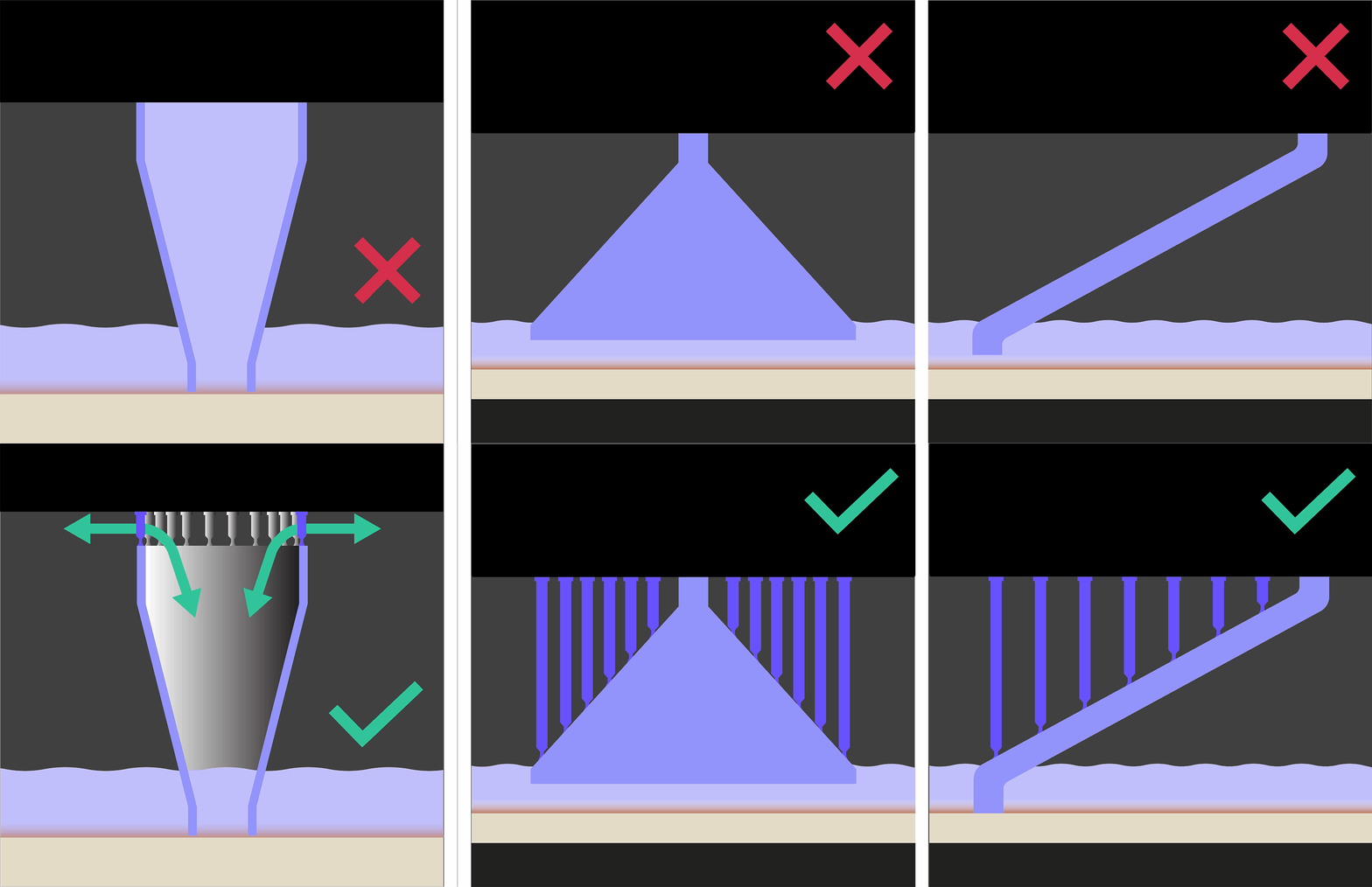
- **Unvented volume**
- Lift the part above the platform on supports to vent the trapped volume
- **Small > large cross section change** or an **asymmetrical orientation**
- Add supports to combat suction forces and to add more adhesion to the platform
:::
:::ExpandableHeading
### Design
- **Unvented volume**
- Add vent holes in the part, at or near the platform, to vent the trapped volume
- Reference [DLS Design Guidelines](docId\:t94PR-A-C0pIhY6LJsWk7) for vent hole guidance.
- **Bevels/fillets at platform**
- Adjust base profile to vertical for a minimum of 1 mm
- Extreme undercuts may require supports
- **Platform footprint**
- Increase footprint on platform for better adhesion
- Add structure to stabilize part against suction forces
:::
:::ExpandableHeading
### Print Plan Adjustments
Reference [Print Plan Adjustments](docId\:NxUK0dltz_vemEAU0DIpN) for guidance on the following parameters:
[1 Pump Up Parameters](docId\:XP2lRJPJ4njFl_Z8N58rL)
*To reduce suction forces*
- *Platform Speed Parameters*
- Motor Up Speed
[4 Settle Down Parameters](docId\:nnb8zuqLpvpRucPpbWwsR)
*For *EPU Pro resins* to increase adhesion*
- *Delay Timing Parameters*
- Minimum Pre-Exposure Delay
[5 Exposure Parameters](docId\:nunXRrM4bWbawUQk0FrDt)
*To increase adhesion*
- *Exposure Timing Parameters*
- Base Exposure Multiplier
- *Brightlining Parameters*
*All four parameters must be specified*
- Brightline Interior Exposure Time
- Brightline Exterior Exposure Time
- Brightline Border Thickness Pixels
- Brightline Outer Borders
:::
:::hint{type="info"}
If problems persist, please reach out to [Carbon Support](mailto\:support@carbon3d.com).
:::
# Explanation & Causes
## Explanation
::::VerticalSplit{layout="left"}
:::VerticalSplitItem
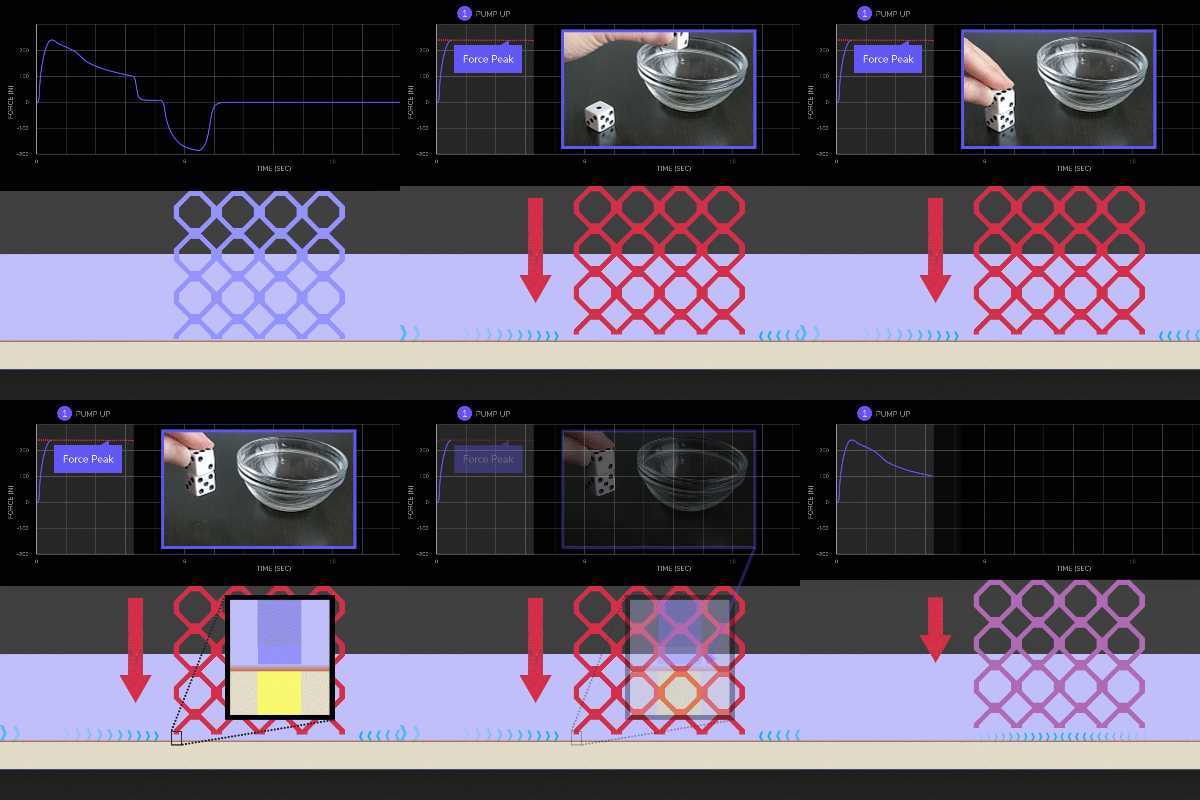
Suction forces pulling down on the part are stronger than the adhesion of the part on the platform.
During normal printing, the suction forces and part adhesion are in balance. Under-adhesion occurs when either the suction forces are higher than normal or adhesion has been decreased.
Reference [DLS Printer Dynamics](docId\:U7XYytjyDp3BvsYy2qKcU) for more information on suction forces.
:::
:::VerticalSplitItem
:::
::::
## Causes
### Print Preparation or Part Design
::::VerticalSplit{layout="middle"}
:::VerticalSplitItem
How the part is **oriented**, **supported**, or **designed **is causing the defect.
:::
:::VerticalSplitItem

:::
::::
| Root Issue | Problem | Why Defect Presents |
| ------------------ | ----------------------------------------------- | --------------------------------------------------------------------------------------------------------------------------------------------------------------------------------------------------- |
| Base cross section | Missing first slice | A blank slice presents at the beginning of the print, restricting adhesion. |
| | Flat base not snapped to platform | The part is rotated slightly such that the platform cross section is too small to maintain adhesion. |
| | Undercut | When only a few slices have been cured, an undercut (filleted or beveled edge) can use suction forces to peel the cured slices off the platform.
EPU, FPU, and UMA are especially susceptible. |
| | Small to large cross section later in the print | Suction forces increase later in the print from large cross sections and the base cross section is not strong enough to overcome the force increase. |
| | Asymmetrically oriented part | Suction forces can cause torque on asymmetrically orientated parts, rotating them off the platform. |
| Unvented volume | | A vacuum in an unvented cavity exacerbates suction forces. |
### Hardware
::::VerticalSplit{layout="middle"}
:::VerticalSplitItem
::Image[]{src="https://api.archbee.com/api/optimize/3CesIL2dYMCHPZvRjp8S0/cNMDprn99RIqCfoLiaEF4_hardware-xs.png" size="80" width="738" height="600" position="center" alt="Hardware" showCaption="false"}
:::
:::VerticalSplitItem
The printer, cassette, or platform is **dirty** or requires **maintenance **to resolve the defect.
Occasionally, a defect may indicate the printer requires servicing by a Carbon engineer.
:::
::::
| Root Issue | Problem | Why Defect Presents |
| ------------ | ------------------------------------------------------------ | -------------------------------------------------------------------------------------------------------------------------------------------- |
| Cleaning | Dirty platform | Part cannot properly adhere to the platform if pre-existing resin is present. |
| | Dirty cassette window | An improperly cleaned window can hinder the UV light required to cure the resin, reducing adhesion. |
| Misalignment | Improper seating | Platforms and cassettes may not seat properly if dirty or incorrectly installed, causing base slices to not fully adhere. |
| | Unlubricated kinematic pin mounts
*M1/M2 Printers only* | Unlubricated kinematic pin mounts are sticky, causing hardware to be misaligned. Misaligned hardware causes base slices to not fully adhere. |
### Resin
::::VerticalSplit{layout="middle"}
:::VerticalSplitItem
The printing material is **expired**, beyond the printing range in its **pot-life**, or has been **improperly mixed**, causing abnormalities in the print.
:::
:::VerticalSplitItem

:::
::::
| Root Issue | Problem | Why Defect Presents |
| ------------- | ------------------------ | ------------------------------------------------------------------------------------------ |
| Expired | | Resin does not cure properly at the base, reducing adhesion. |
| Past pot-life | | |
| Mixing | One-part resin not mixed | Pigment must be fully distributed in resin to cure properly at the base for full adhesion. |
### Print Plan Adjustments
::::VerticalSplit{layout="middle"}
:::VerticalSplitItem

:::
:::VerticalSplitItem
[Print Plan Adjustments](docId\:NxUK0dltz_vemEAU0DIpN) adjust the print plan to optimize mid to high volume production and/or address part defects.
In doing so, adjustment may both **prevent or cause defects**. Below are adjustments that can cause this defect.
:::
::::
| Printing Stage | Parameter Type | Type of Adjustment | Why Defect Presents |
| -------------- | --------------- | ----------------------------------------- | -------------------------------------------------------------------------------------------------------------------------- |
| 1 Pump Up | Platform Speed | **Increase** | Increased Motor Up Speed increases suction forces |
| 4 Settle Down | Delay Timing | **Decrease** | For EPU Pros only, less delay time before exposure can impact adhesion when less heat has saturated the platform and resin |
| 5 Exposure | Exposure Timing | **Decrease** | Adhesion is decreased with less UV exposure |
| 5 Exposure | Brightlining | **Decrease** | Adhesion is decreased with less UV exposure |