---
title: Resin Starvation
slug: troubleshooting/resin-starvation
description: Discover effective solutions for addressing the "Resin Starvation" part defect from Carbon DLS printing. This comprehensive document explains how to identify, troubleshoot, and understand the root causes.
docTags:
createdAt: 2024-06-14T01:00:48.577Z
---
::::VerticalSplit{layout="left"}
:::VerticalSplitItem
**Resin Starvation**
Resin runs out during a print or is locally starved due to part geometry.
:::
:::VerticalSplitItem
::Image[]{src="https://api.archbee.com/api/optimize/3CesIL2dYMCHPZvRjp8S0/WAS0RiLExxdopZDRd-zQY_image.png" size="70" width="1080" height="1080" position="center" alt="Resin Starvation" showCaption="false"}
:::
::::
# How to Identify
Resin Starvation can be diagnosed as follows:
- Window is not fully covered with resin at print’s end.
- Part feature(s) are missing or did not fully resolve.
:::hint{type="info"}
[Voids](docId\:EGeuPfGjx2gIihhaZD6_0) is a defect that can appear similar as it arises from similar circumstances.
:::
::::LinkArray{contentSource="CUSTOM"}
:::LinkArrayItem{headerType="IMAGE" headerImage="https://api.archbee.com/api/optimize/Nvx7WdIjE2XFpMaBlbCES-DtDLhjM6pNeyzVfuyxaiI-20240821-173515.png"}
**Cause -** **Unvented Volume**
**Solution** - Print Preparation or Part Design
:::
:::LinkArrayItem{headerType="IMAGE" headerImage="https://api.archbee.com/api/optimize/Nvx7WdIjE2XFpMaBlbCES-bE7xnKEd504k1hea4JOpQ-20240821-173522.png"}
**Cause -** **Part Geometry**
**Solution** - Print Preparation or Part Design
:::
:::LinkArrayItem{headerType="IMAGE" headerImage="https://api.archbee.com/api/optimize/Nvx7WdIjE2XFpMaBlbCES-p0lTRVzN9Gc7uXo0G_9iI-20240821-173529.png"}
**Cause** - Inconclusive
:::
:::LinkArrayItem{headerType="IMAGE" headerImage="https://api.archbee.com/api/optimize/Nvx7WdIjE2XFpMaBlbCES-v8TUhWvO5fGuIDG73cPRj-20240821-173541.jpg"}
**Cause** - Inconclusive
:::
:::LinkArrayItem{headerType="IMAGE" headerImage="https://api.archbee.com/api/optimize/Nvx7WdIjE2XFpMaBlbCES-HbHJ5KGZcOp750TNeAtf_-20240821-173551.jpg"}
**Cause** - Inconclusive
:::
:::LinkArrayItem{headerType="IMAGE" headerImage="https://api.archbee.com/api/optimize/Nvx7WdIjE2XFpMaBlbCES-6Qh1NVOV_gvLhBok_taM--20240821-173601.jpg"}
**Cause** - **Resin Amount**
**Solution** - Resin Check
:::
::::
# Troubleshooting
:::hint{type="info"}
It is recommended that you review all the possible solutions before taking action to ensure you are pursuing the best course of action.
:::
If the best course of action is not apparent, try the troubleshooting options in the order listed. Refer [here](docId\:pPm8gmeGCY_0fkFwgTCyj) for more tips.
## Process, Material, and Hardware Checks
If any of these conditions apply to your print, take the corrective action and reprint to see if the problem is resolved.
:::::ExpandableHeading
### Resin
::::VerticalSplit{layout="right"}
:::VerticalSplitItem
Always dispense the Required Resin Volume displayed in Project Analysis tab. Reference [Project Analysis](docId\:gfR-GoC-Irq_L9_KanC-X) in the Printer UI training.
- This is the minimum amount of resin to dispense.
- For multiple prints, add the part and support volume for each additional print.
Check the resin in the cassette between prints:
- To make sure resin fully covers the window.
- To verify there is enough resin for another build according to the Required Resin Volume.
:::
:::VerticalSplitItem

:::
::::
:::::
## Diagnostics
If the above checks & actions did not resolve the issue or do not apply to your print, the following diagnostics may further inform what is causing the issue.
:::::::ExpandableHeading
### Hardware
::::::WorkflowBlock
:::::WorkflowBlockItem
**Verify if the printer is level**
::::VerticalSplit{layout="right"}
:::VerticalSplitItem
- Place a digital or bubble level on the printer deck, where the cassette interfaces with the printer. Orient the level in multiple directions to verify.
:::
:::VerticalSplitItem

:::
::::
- Pour a small amount of resin in the cassette and install the cassette in the printer.
Let the resin settle in place and inspect the resin to see if it flowed to one side or area of the cassette.
- Run an [Alignment Squares Test](docId\:eneYDJvgK9I1zhog5jjJE).
:::::
:::WorkflowBlockItem
**If the printer is not level**
- [M3/M3 Max Printers](docId\:cUc-4ICE6KvrrgvJRfxrJ) - Follow procedure to level your printer.
- All other printers (**M1, M2, L1)** - Contact [Carbon Support](mailto\:support@carbon3d.com) to have your printer leveled by a Carbon field service engineer. **Do not attempt to self-level these printers.**
:::
::::::
:::::::
## Print Preparation or Part Design Adjustments
The following solutions will address print or part-related causes of the defects. Choose among the suggested actions below and select the best approach for your application. Usually only one type of adjustment is needed.
::::::ExpandableHeading
### Orientation
:::::VerticalSplit{layout="middle"}
::::VerticalSplitItem
- **Part Geometry**
- Reorient parts such that features which hold resin during printing are positioned to allow resin to drain and flow during printing.
- **Unvented Volume**
- Reorient the part to vent the trapped volume
:::hint{type="info"}
Supports may be needed with a new orientation.
:::
::::
:::VerticalSplitItem

:::
:::::
::::::
:::::ExpandableHeading
### Supports
::::VerticalSplit{layout="middle"}
:::VerticalSplitItem
- **Unvented volume**
- Lift the part above the platform on supports to vent the trapped volume
- If supporting with fences around the perimeter, you may need to break the fence up into two or three lengths with 2mm gaps in between to provide adequate venting.
:::
:::VerticalSplitItem

:::
::::
:::::
:::::ExpandableHeading
### Design
::::VerticalSplit{layout="middle"}
:::VerticalSplitItem
- **Part Geometry**
- Add drain holes in the part
- **Unvented Volume**
- Add vent holes in the part, at or near the platform, to vent the trapped volume
Reference [DLS Design Guidelines](docId\:t94PR-A-C0pIhY6LJsWk7) for drain/vent hole guidelines.
:::
:::VerticalSplitItem

:::
::::
:::::
::::::ExpandableHeading
### Print Profile
:::::VerticalSplit{layout="middle"}
:::VerticalSplitItem
**Small Unvented Volumes**
*Available in software *[v1.46](docId\:M57IWulEuClyGcsBkFE62)
*and higher.*
:::
::::VerticalSplitItem
For use with prints where there is distortion or **extra cured resin** on the surface of critical features **inside holes**.
:::hint{type="info"}
Most commonly seen in analog or anterior **die holes in DPR 10**, but applicable to any application with similarly fitting parts like connectors.
:::
May also help with [Resin Starvation](docId:3EIqqQqCGKwU6QNgdR5Ox) in parts with large window-facing cross sections.
::::
:::::
::::VerticalSplit{layout="middle"}
:::VerticalSplitItem
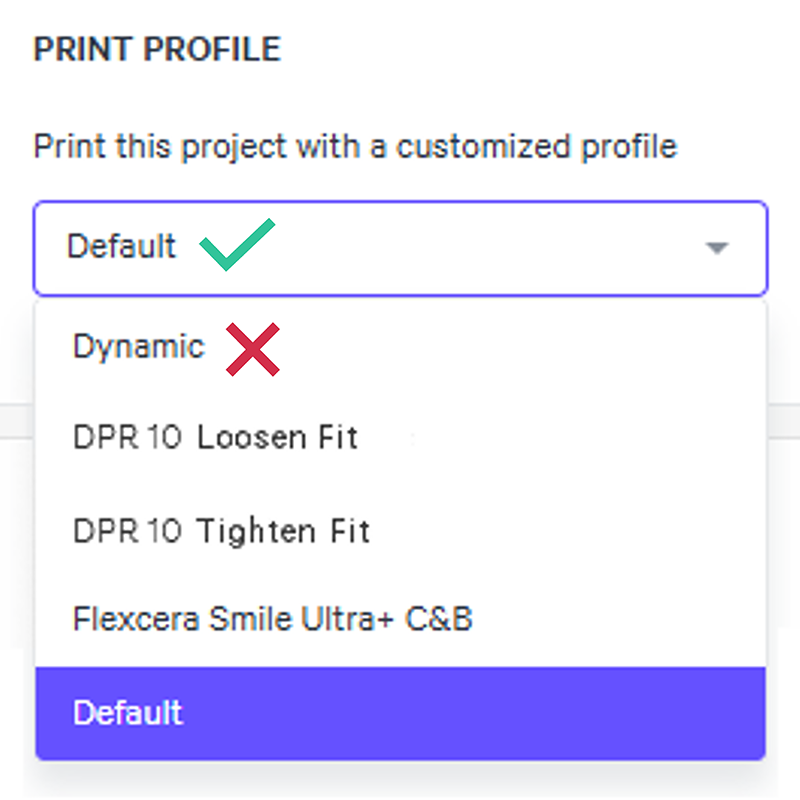
**Default**
Print using the **Default** print profile instead of Dynamic to slow down the print. Reference [Print Profile](docId\:N9rCrE4j391HMxwvP-udG).
- Dynamic is a tool for **M1 and M2** printers.
- Force feedback (FFB) printers (M3, M3 Max, L1) will see minimal to no difference in print speed with the dynamic print profile, so this troubleshooting option is unlikely to help.
:::
:::VerticalSplitItem
:::
::::
::::::
:::ExpandableHeading
### Print Plan Adjustments
Reference [Print Plan Adjustments](docId\:NxUK0dltz_vemEAU0DIpN) for guidance on the following parameters:
[1 Pump Up Parameters](docId\:XP2lRJPJ4njFl_Z8N58rL)
- *Pump Height Parameters*
- Minimum Pump Height
- Distance from Peak Multiplier
- Minimum Distance from Peak
[2 Settle Up Parameters](docId\:jbGzJhMSIOJ0jg_iX8EpR)
- *Delay Timing Parameters*
- Force Slope Up Settled Threshold
- Minimum Time Force Slope Up Settled
:::
:::hint{type="info"}
If problems persist, please reach out to [Carbon Support](mailto\:support@carbon3d.com).
:::
# Explanation & Causes
## Explanation
::::VerticalSplit{layout="left"}
:::VerticalSplitItem
Resin starvation can occur during a print if:
- Not enough resin was dispensed.
- The printer is not level, most noticeable with an L1 printer.
- Features in the geometry prevent a large volume of resin from draining, such as unvented volumes.
This can also lead to localized areas of starvation from restricted resin flow, as opposed to a lack of enough resin in the cassette.
:::
:::VerticalSplitItem

:::
::::
## Causes
### Print Preparation or Part Design
::::VerticalSplit{layout="middle"}
:::VerticalSplitItem
How the part is **oriented**, **supported**, or **designed **is causing the defect.
:::
:::VerticalSplitItem

:::
::::
| Root Issue | Problem | Why Defect Presents |
| --------------- | ----------------------------------------- | --------------------------------------------------------------------------------------------------------------------------------- |
| Part Geometry | Resin is not draining from part features. | Certain geometries, such as manifolds, can trap resin during printing if the part is not oriented or designed to drain the resin. |
| Part Geometry | Straw effect | Holes in the part geometry can pull in resin during the pump up stage from suction forces. |
| Unvented Volume | Resin trapped in unvented volume. | Resin cannot drain from an unvented volume because the pressure differential holds the resin inside the enclosed volume. |
### Hardware
::::VerticalSplit{layout="middle"}
:::VerticalSplitItem
::Image[]{src="https://api.archbee.com/api/optimize/3CesIL2dYMCHPZvRjp8S0/cNMDprn99RIqCfoLiaEF4_hardware-xs.png" size="80" width="738" height="600" position="center" alt="Hardware" showCaption="false"}
:::
:::VerticalSplitItem
The printer, cassette, or platform is **dirty** or requires **maintenance **to resolve the defect.
Occasionally, a defect may indicate the printer requires servicing by a Carbon engineer.
:::
::::
| Root Issue | Problem | Why Defect Presents |
| ---------- | ---------------------------------------------- | -------------------------------------------------------------------------------------------------------------------- |
| Leveling | Resin level is too low in one area of cassette | If the printer is not level, the resin may not cover the window if it's pooling on one side or area of the cassette. |
### Resin
::::VerticalSplit{layout="middle"}
:::VerticalSplitItem
The printing material is **expired**, beyond the printing range in its **pot-life**, or has been **improperly mixed**, causing abnormalities in the print.
:::
:::VerticalSplitItem

:::
::::
| Root Issue | Problem | Why Defect Presents |
| ---------- | ------------------------------ | ---------------------------------------------------------------------------------------------------------------------------------------------------- |
| Dispensing | Not enough resin was dispensed | The recommended resin volume is meant to cover the window fully during printing in addition to providing the material for the part & support volume. |
### Print Plan Adjustments
::::VerticalSplit{layout="middle"}
:::VerticalSplitItem

:::
:::VerticalSplitItem
[Print Plan Adjustments](docId\:NxUK0dltz_vemEAU0DIpN) adjust the print plan to optimize mid to high volume production and/or address part defects.
In doing so, adjustment may both **prevent or cause defects**. Below are adjustments that can cause this defect.
:::
::::
| Printing Stage | Parameter Type | Type of Adjustment | Why Defect Presents |
| -------------- | -------------- | ----------------------------------------- | ------------------------------------------------------------------------------------------------------------ |
| 1 Pump Up | Pump Height | **Decrease** | A decrease in the pump height can limit how much resin can flow out of part geometries that hold resin. |
| 2 Settle Up | Delay Timing | **Decrease** | A shortened settle up stage limits the amount of time resin can flow out of part geometries that hold resin. |