---
title: Caping
slug: troubleshooting/caping
description: Discover effective solutions for addressing the "Caping" part defect from Carbon DLS printing. This comprehensive document explains how to identify, troubleshoot, and understand the root causes.
docTags:
createdAt: 2024-06-14T01:05:22.016Z
---
::::VerticalSplit{layout="left"}
:::VerticalSplitItem
**Caping**
Capes or sheets of resin form on and between parts/features
:::
:::VerticalSplitItem
::Image[]{src="https://api.archbee.com/api/optimize/3CesIL2dYMCHPZvRjp8S0/hUwsbtRfboAG-4dQiGn4X_image.png" size="70" width="1680" height="1680" position="center" alt="Caping" showCaption="false"}
:::
::::
# How to Identify
Caping can be diagnosed as follows:
- Irregularly shaped strands/sheets of cured resin on the exterior of and between parts on the build.
- This is an uncommon defect.
- This is an extreme form of [Veining](docId\:JjgVKSG_a4HnG6aTN-IY2)**.**
::::LinkArray{contentSource="CUSTOM"}
:::LinkArrayItem{headerType="IMAGE" headerImage="https://api.archbee.com/api/optimize/Nvx7WdIjE2XFpMaBlbCES-sg7Iqjs_ARqKdMws40g2Z-20240729-161154.jpg"}
**Cause** - **Layout**
**Solution** - Print Preparation or Part Design
:::
:::LinkArrayItem{headerType="IMAGE" headerImage="https://api.archbee.com/api/optimize/Nvx7WdIjE2XFpMaBlbCES-a5D7-0Sg3cZuVVwF7JzgF-20240729-161325.jpg"}
**Cause** - Inconclusive
:::
::::
# Troubleshooting
:::hint{type="info"}
It is recommended that you review all the possible solutions before taking action to ensure you are pursuing the best course of action.
:::
If the best course of action is not apparent, try the troubleshooting options in the order listed. Refer [here](docId\:pPm8gmeGCY_0fkFwgTCyj) for more tips.
## Process, Material, and Hardware Checks
If any of these conditions apply to your print, take the corrective action and reprint to see if the problem is resolved.
:::::ExpandableHeading
### Resin Selection
::::VerticalSplit{layout="right"}
:::VerticalSplitItem
- Double check that the resin selected in the UI for the build was the same resin printed.
:::
:::VerticalSplitItem

:::
::::
:::::
:::ExpandableHeading
### Resin Handling After Printing
**M1, M2, or L1 Printers: **
- Check window between prints for debris
Reference [Debris Detection](docId\:kQYgmwDX_5LNp-uy81_Xt) for more information.
:::
:::ExpandableHeading
### Hardware
- Ensure all of the **printer's optics are clean** for a clear path for UV light.
- Verify the **cassette window** is cleaned properly, without dust, spots, or streaks.
- Verify the **projector path** is clean
- M1/M2 printers - check the deck glass
- M3/M3 Max/L1 printers - check the projector lens
Reference cleaning instructions for your printer: [M1/M2 Printer](docId:__6PWz7Jx_jb4L5_xWKOJ), [M3/M3 Max Printer](docId:3YymGGIHdvaOwG01EAY6l), [L1 Printer](docId\:oN8OtjugBxOTH6QMqW2oM).

:::
## Diagnostics
If the above checks & actions did not resolve the issue or do not apply to your print, the following diagnostics may further inform what is causing the issue.
:::ExpandableHeading
### Hardware
- Inspect cassette for contamination or damage.
Reference [Cassette Care](docId\:Y_IMi7AeVLyJbsATEXxdB) for more information.
- Print with a different cassette
- If the issue is resolved with another cassette, reach out to [Carbon Support](mailto\:support@carbon3d.com) for assistance with the problematic hardware.
::embed[]{url="https://player.vimeo.com/video/556342954?dnt=1"}
:::
## Print Preparation or Part Design Adjustments
The following solutions will address print or part-related causes of the defects. Choose among the suggested actions below and select the best approach for your application. Usually only one type of adjustment is needed.
:::::ExpandableHeading
### Supports
::::VerticalSplit{layout="middle"}
:::VerticalSplitItem
- Adjust supports to allow more space between part and support.
- Adjust density of supports to allow for more resin flow.
:::
:::VerticalSplitItem

:::
::::
:::::
:::ExpandableHeading
### Layout
Increase padding to at least 5 mm. Reference [Layout](docId\:SJ39gtBagt0cSGVVlCfli).

:::
::::::ExpandableHeading
### Print Profile
:::::VerticalSplit{layout="middle"}
:::VerticalSplitItem
**Small Unvented Volumes**
*Available in software *[v1.46](docId\:M57IWulEuClyGcsBkFE62)
*and higher.*
:::
::::VerticalSplitItem
For use with prints where there is distortion or **extra cured resin** on the surface of critical features **inside holes**.
:::hint{type="info"}
Most commonly seen in analog or anterior **die holes in DPR 10**, but applicable to any application with similarly fitting parts like connectors.
:::
May also help with [Resin Starvation](docId:3EIqqQqCGKwU6QNgdR5Ox) in parts with large window-facing cross sections.
::::
:::::
::::VerticalSplit{layout="middle"}
:::VerticalSplitItem
**Default**
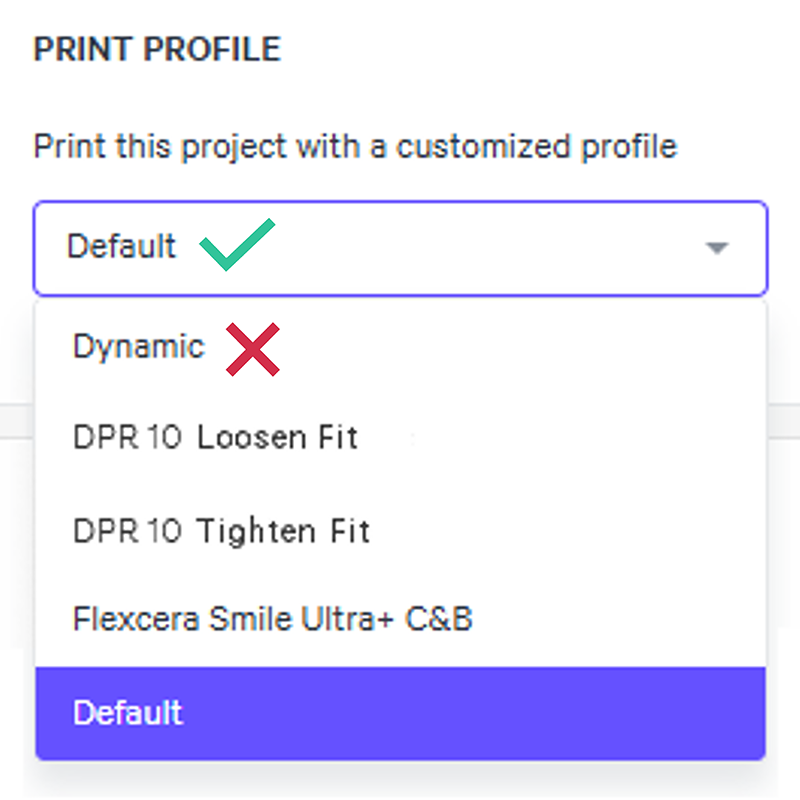
Print using the **Default** print profile instead of Dynamic to slow down the print. Reference [Print Profile](docId\:N9rCrE4j391HMxwvP-udG).
- Dynamic is a tool for **M1 and M2** printers.
- Force feedback (FFB) printers (M3, M3 Max, L1) will see minimal to no difference in print speed with the dynamic print profile, so this troubleshooting option is unlikely to help.
:::
:::VerticalSplitItem
:::
::::
::::::
:::ExpandableHeading
### Print Plan Adjustments
Reference [Print Plan Adjustments](docId\:NxUK0dltz_vemEAU0DIpN) for guidance on the following parameters:
[4 Settle Down Parameters](docId\:nnb8zuqLpvpRucPpbWwsR)
- Delay Timing Parameters
- Minimum Pre-Exposure Delay
- Minimum Time Force Slope Down Settled
:::
:::hint{type="info"}
If problems persist, please reach out to [Carbon Support](mailto\:support@carbon3d.com).
:::
# Explanation & Causes
## Explanation
- Stray UV light partially cures a film of resin close to the window. That film eventually attaches to the part and is pulled up as the part builds.
- The build is not receiving the proper dosage of light and/or oxygen.
- Overheated resin disrupting the normal pigment concentration and disbursement.
## Causes
### Print Preparation or Part Design
::::VerticalSplit{layout="middle"}
:::VerticalSplitItem
How the part is **oriented**, **supported**, or **designed **is causing the defect.
:::
:::VerticalSplitItem

:::
::::
| Root Issue | Problem | Why Defect Presents |
| ------------- | --------------------------- | ---------------------------------------------------------------------------------------------------------------------------------- |
| Supports | Over-supported | Parts that are over-supported provide less space for resin to flow properly throughout the build causing light to scatter. |
| Layout | Parts too dense on platform | Padding between parts is to small for resin to flow properly throughout the build causing light to scatter. |
| Print Profile | Print too fast in Dynamic | A shortened print gives less time for resin flow to all areas of the build causing light to scatter.
*For M1 and M2 printers* |
### Hardware
::::VerticalSplit{layout="middle"}
:::VerticalSplitItem
::Image[]{src="https://api.archbee.com/api/optimize/3CesIL2dYMCHPZvRjp8S0/cNMDprn99RIqCfoLiaEF4_hardware-xs.png" size="80" width="738" height="600" position="center" alt="Hardware" showCaption="false"}
:::
:::VerticalSplitItem
The printer, cassette, or platform is **dirty** or requires **maintenance **to resolve the defect.
Occasionally, a defect may indicate the printer requires servicing by a Carbon engineer.
:::
::::
| Root Issue | Problem | Why Defect Presents |
| ------------- | -------------------------------------- | -------------------------------------------------------------------- |
| Cleaning | Cassette window is dirty | A dirty or faulty cassette inhibiting regular light and oxygen flow. |
| | Deck glass is dirty (M1/M2) | |
| | Projector lens is dirty (M3/M3 Max/L1) | |
| Window Damage | | A dirty or faulty cassette inhibiting regular light and oxygen flow. |
### Resin
::::VerticalSplit{layout="middle"}
:::VerticalSplitItem
The printing material is **expired**, beyond the printing range in its **pot-life**, or has been **improperly mixed**, causing abnormalities in the print.
:::
:::VerticalSplitItem

:::
::::
| Root Issue | Problem | Why Defect Presents |
| ----------------------------------------- | ---------------------------------------------- | ------------------------------------------------------------------------------------------------------------------------------------------------------------------------------------------------------------------------------------------------------------------------------ |
| Resin Selection | Wrong resin | The print is not receiving the proper dosage of resin. |
| Resin Handling After Printing
| Not checking window between prints
| Not checking the window between prints could leave accidental debris behind for the next print that inhibits proper UV exposure.
Additionally, checking the window helps cool down the resin between prints. Overly heated resin can disrupt normal pigment disbursement. |
### Print Plan Adjustments
::::VerticalSplit{layout="middle"}
:::VerticalSplitItem

:::
:::VerticalSplitItem
[Print Plan Adjustments](docId\:NxUK0dltz_vemEAU0DIpN) adjust the print plan to optimize mid to high volume production and/or address part defects.
In doing so, adjustment may both **prevent or cause defects**. Below are adjustments that can cause this defect.
:::
::::
| Printing Stage | Parameter Type | Type of Adjustment | Why Defect Presents |
| -------------- | -------------- | ----------------------------------------- | ------------------------------------------------------------------------------------------------------------ |
| 4 Settle Down | Delay Timing | **Decrease** | The settle down phase is too fast for proper resin flow and oxygen recharge, build causing light to scatter. |