v1.31
Release Notes: Software v1.31
Overview
Hello. Thank you so much for your support and engagement with our teams. Your feedback helps drive our development process and makes our products better.
In this release, we’ve included the following improvements to your print process:
Changes in how we print:
- There are no changes to the way we print in this release
Other improvements:
- Auto Orientation BETA
- Fence Supports
- New project creation dialog
- Project name token in labels
We can’t wait to hear from you about this release. Keep printing great parts and sharing your feedback.
If you have any questions, please contact the Carbon Service Team at [email protected].
Other Improvements
Auto Orientation BETA
We’re releasing the first version of our new Auto Orientation tool to provide recommended orientations for your parts. Use the advanced options to tailor the tool to your needs. The tool is currently in beta and is not optimized for elastomeric resins or for parts intended to be printed snapped to the platform.
To learn more about the feature and general best practices on orienting to achieve a successful part, please refer to our new Orientation & Supports
Help us improve the tool in the next few releases by telling us about your experience through the feedback form in the UI itself.
Please note that this tool has not been optimized or validated for dental use.

Fence supports
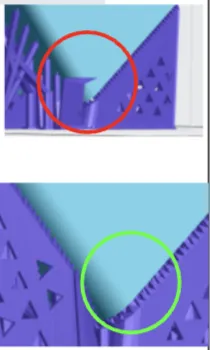
We have improved the way that we draw fences to reduce the “flared feet” seen when short (<5mm) fences are drawn. This is applicable to fences generated manually and through the patch support selection.
New project creation dialog
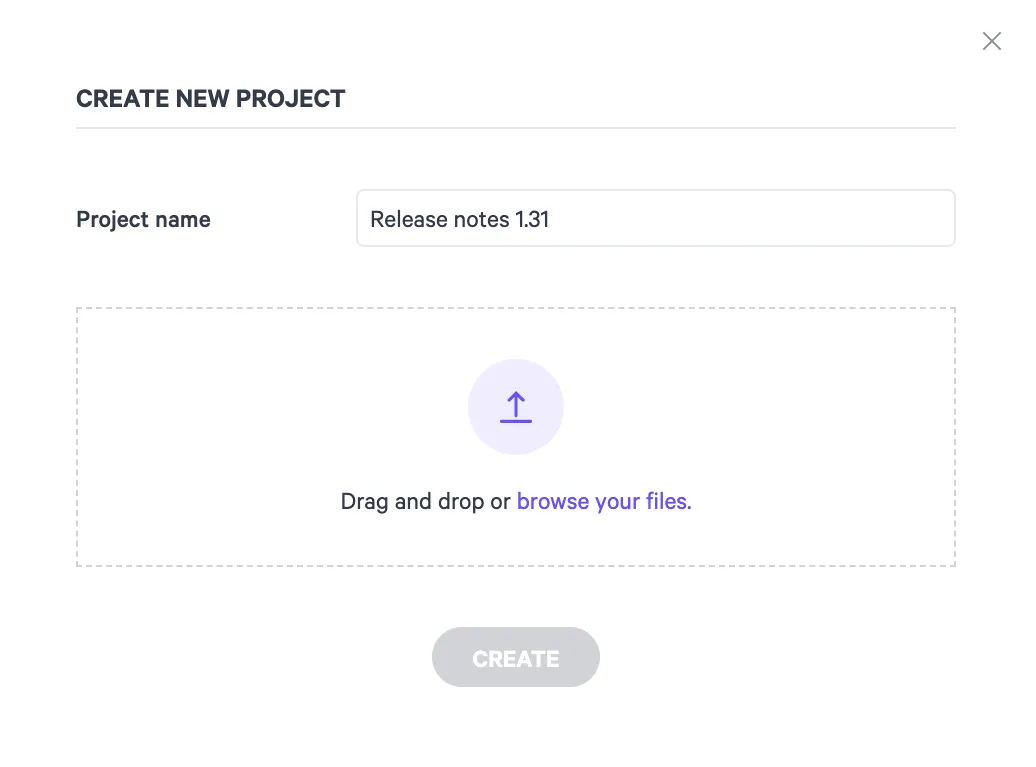
The new project creation dialog allows for you to drag and drop files from multiple locations, and set the name of your project prior to the project being created.
Project name token in labels
You can now use your project’s name as a token in your labels by using {project_name} in the “Label text” field.
Thanks for your feedback
We love hearing from you about your workflow, your parts, and how to improve. Keep your insightful feedback and ratings coming. We read them carefully and follow up when you request that we contact you. If you prefer real-time feedback, you can always contact the Carbon Service Team, [email protected].