---
title: Lattice Search
slug: software/lattice-search
description: Discover Carbon Design Engine's extensive metamaterials library, featuring a vast selection of unit cells for your design needs. Filter through thousands of lattices based on performance and lattice parameters.
docTags:
createdAt: 2024-06-06T00:05:50.163Z
---
Find unit cells to meet the performance and aesthetic criteria for your designs in Design Engine's metamaterials library.
Jump to Section:
- [Filters](docId\:LlWKO8SuVfs2j3cEjz6YR)
- [Lattice Search Demo](docId\:LlWKO8SuVfs2j3cEjz6YR)
- [Foam to Lattice Workflow](docId\:LlWKO8SuVfs2j3cEjz6YR)
::::VerticalSplit{layout="right"}
:::VerticalSplitItem
:::
:::VerticalSplitItem
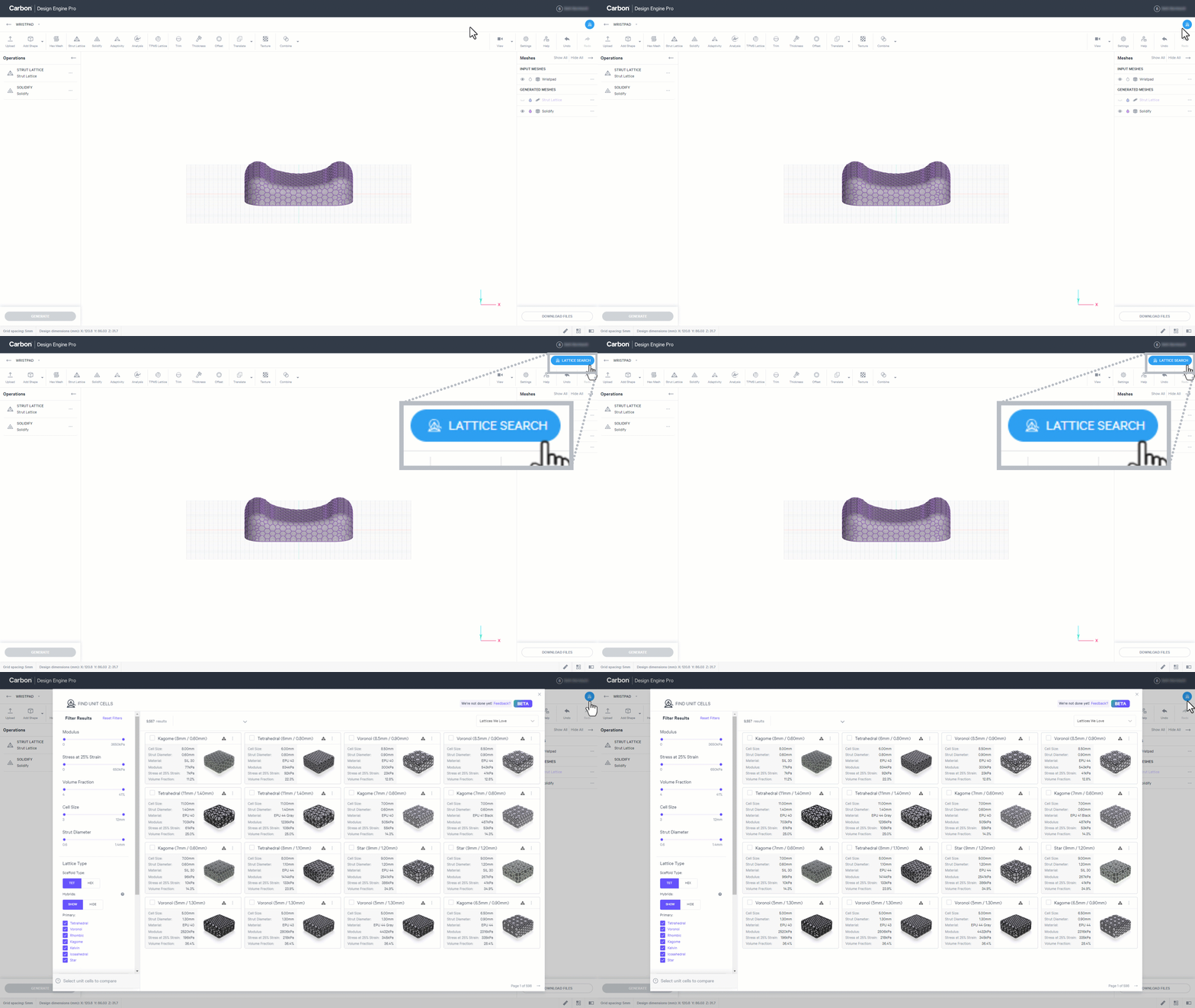
Launch **Lattice Search **from the quick-access button on the upper right of the design user interface.
:::
::::
:::hint{type="info"}
You can also launch **Lattice Search **from inside the **Strut Lattice** tool, under [Lattice Type](docId\:LlWKO8SuVfs2j3cEjz6YR). This will enable you to **apply unit cell **from your search **directly to an input mesh**, as shown in the demo video below.
:::
# Filters
Thousands of lattices are available in the metamaterials library and Design Engine provides filter options to narrow your results **by performance **and **by lattice parameters**.
## Performance Filters
Two filters are available to search by stiffness within the unit cell's stress-strain curve: **modulus **and **stress at 25% strain**. You can also search by **volume fraction **to estimate the weight of the lattice.
::::VerticalSplit{layout="left"}
:::VerticalSplitItem
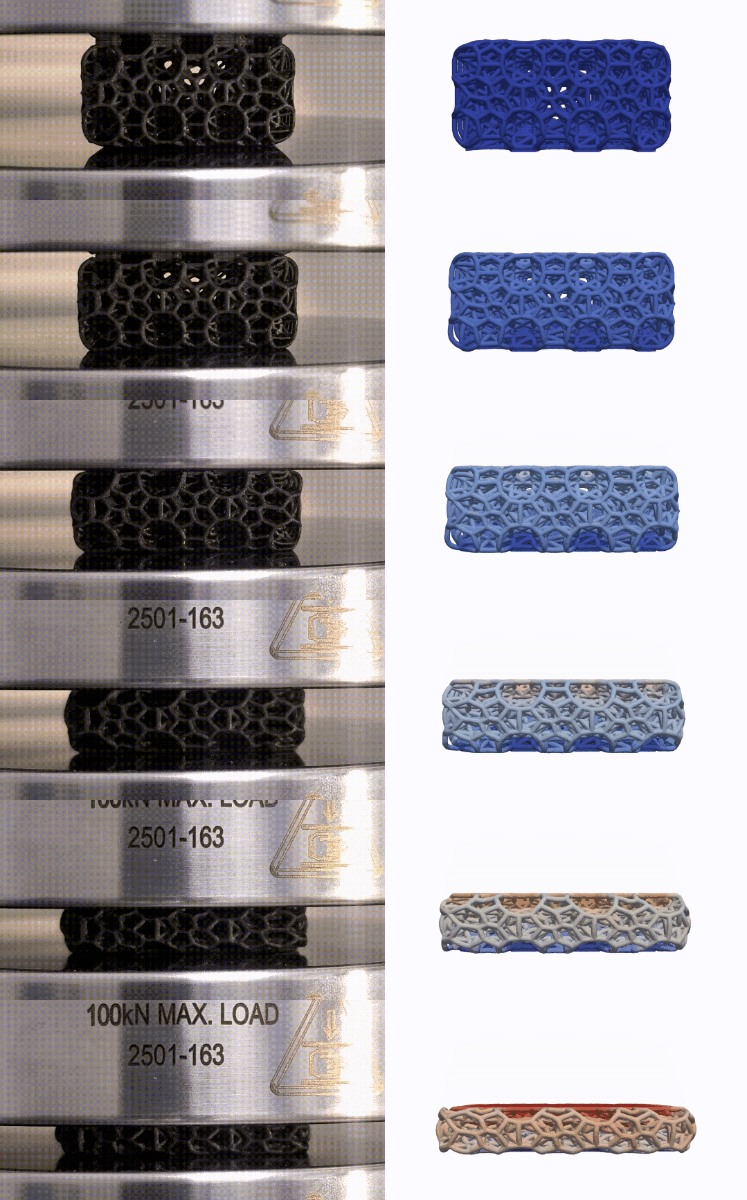
**Simulated Testing**
In order to have performance data for thousands of lattices, the library utilizes simulated testing.
:::
:::VerticalSplitItem
:::
::::
Results yield a stress/strain curve and volume fraction for each lattice.
*For more details, read *[Building Carbon's Metamaterials Library](https://www.carbon3d.com/resources/engineering/building-carbons-metamaterials-library)*.*
:::hint{type="warning"}
**Because data is based on simulations, final part performance may vary.**
Our simulated mechanical response data reasonably matched experimental data on the small set of lattices we tested in a physical setting. However, these tests were performed with ideal, simple parts in a controlled environment. We do not expect the precise numbers shown to accurately describe performance of parts that are more complex or used in less ideal settings. The data like the stress-strain curves shown in Design Engine are best used as a comparative tool in evaluating a lattice’s performance relative to other lattices. Actual lattice behavior depends on specific use and is subject to variation inherent in manufacturing processes and different environments in which products are used. Users should validate lattice behavior in settings specific to their needs.
:::
:::ExpandableHeading
### Modulus
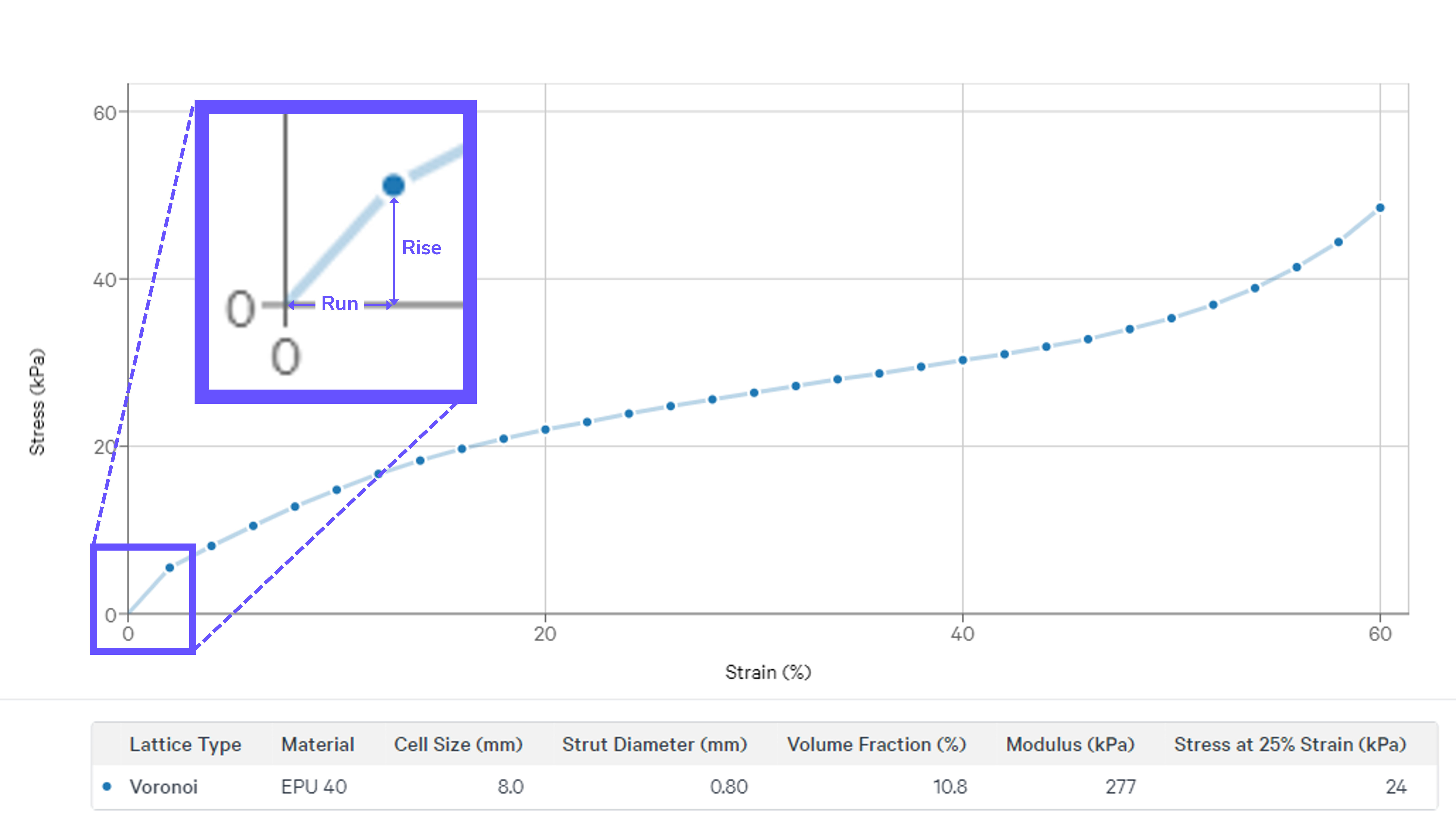
**Young's modulus**, or modulus of elasticity in compression, is calculated in the **linear elastic range** of compression. The slope of the stress-strain curve in this range, rise over run, provides a performance metric for **how stiff the lattice is before yielding**, or buckling. The higher the number, the stiffer the lattice in this range.
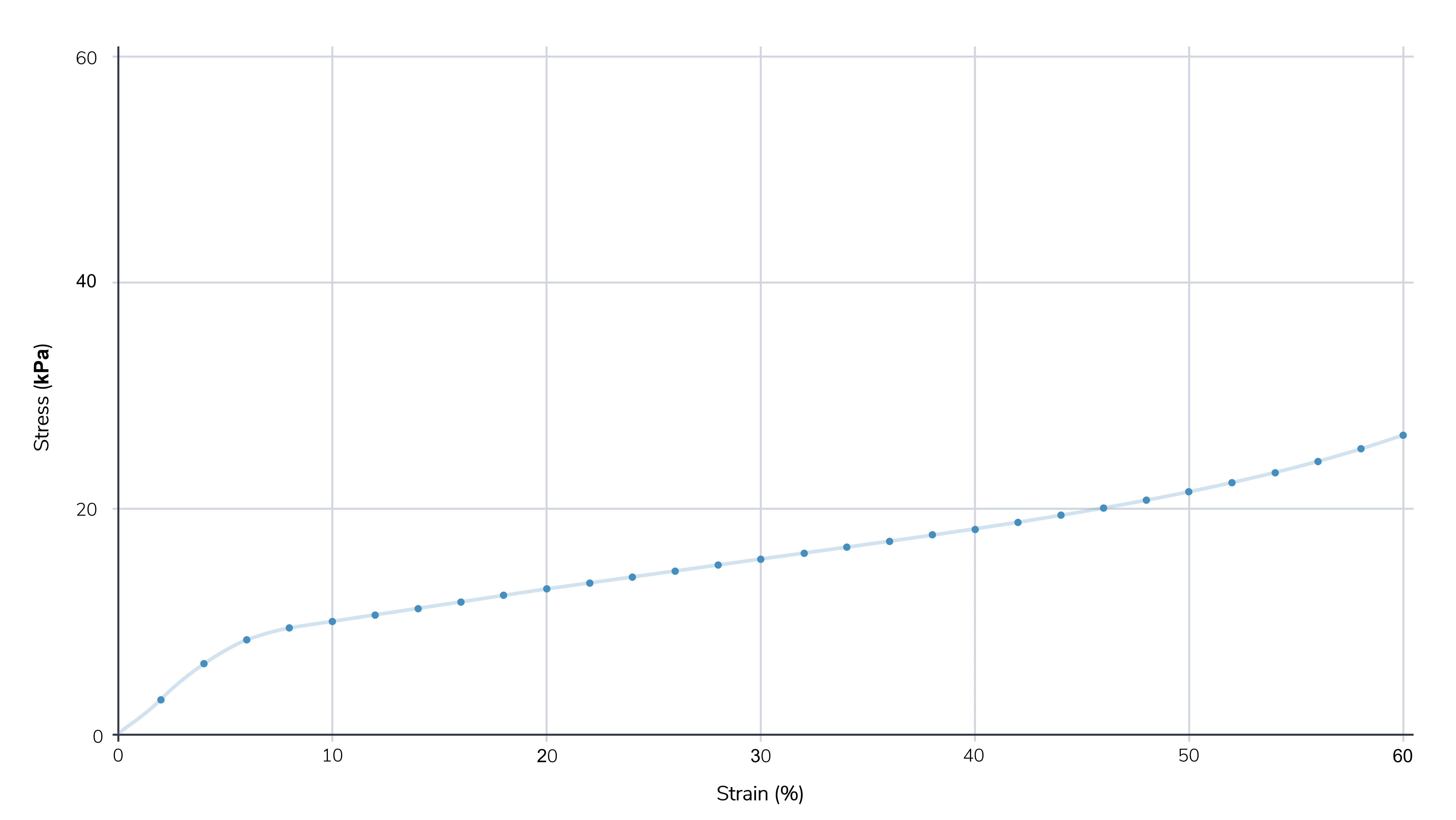
In the example shown, the lattice exhibits 5.54 kPa of stress at 2% strain for a modulus of 277 kPa (a relatively compressible lattice, ie not stiff).
:::
::::ExpandableHeading
### Stress at 25% Strain
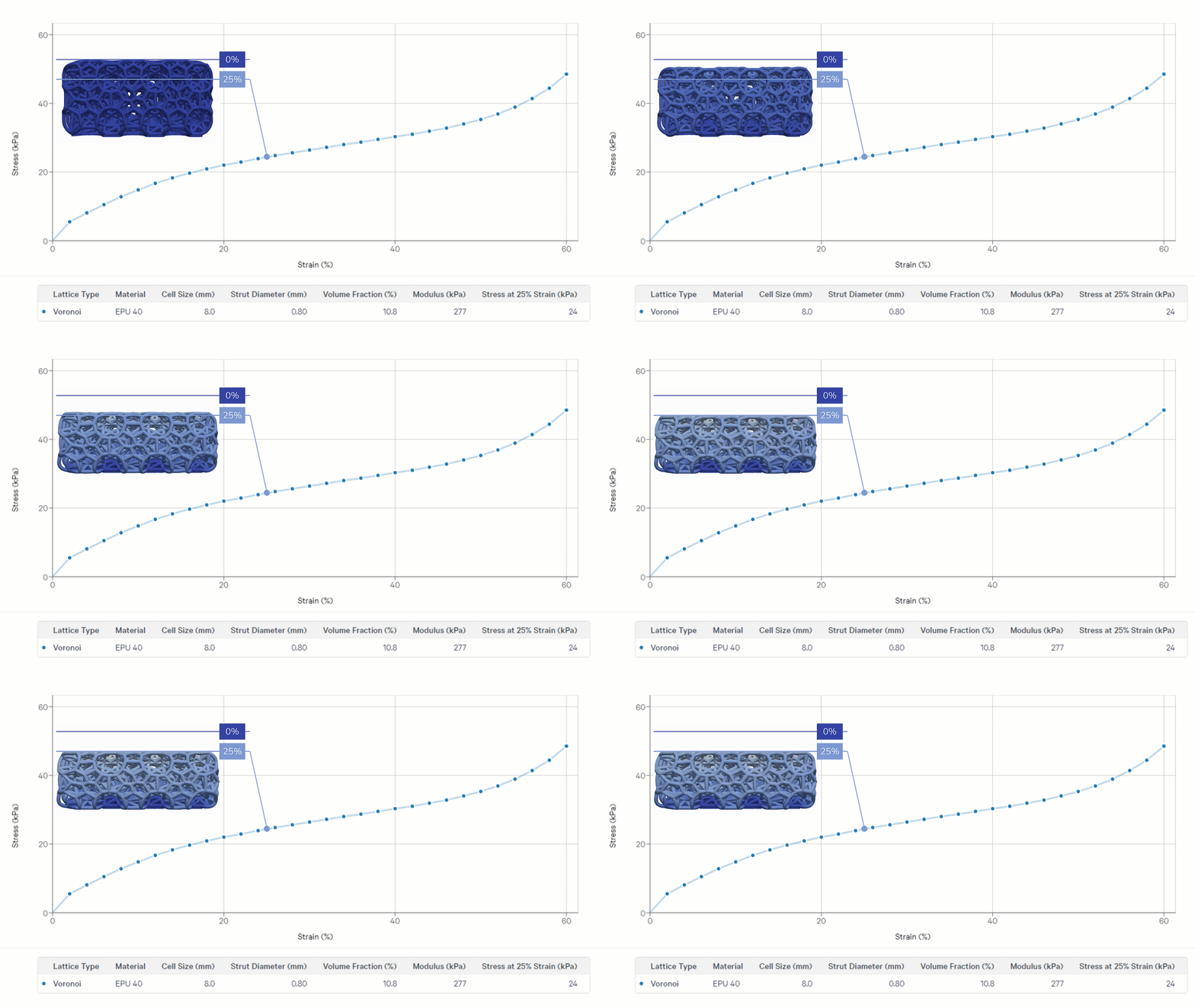
25% strain is a common benchmark to reference stiffness in the **plateau range** of compression, where the lattice is yielding, or buckling, under stress. This is how much **pressure** is needed to **compress the lattice by 25%**. The higher the number, the stiffer the lattice in this range.
In the example shown, the lattice requires 24 kPa of stress to compress by 25% (a relatively compressible lattice, ie not stiff).
:::hint{type="info"}
For more information on what the stress-strain curve can tell you, reference the **How to Read Graph **section in the **Lattice Parameters - Lattice Types **lesson.
:::
::::
:::hint{type="info"}
For more information on stress-strain graphs, reference [Stress-Strain Curves](docId\:f-f8ROxDabcRrBEUDh6Q1).
:::
::::ExpandableHeading
### Volume Fraction
Volume fraction indicates the **% of volume** the lattice uses out of the total volume of the design space.
- Volume fraction is most useful to **estimate the weight **of your latticed part. Calculate the weight of your lattice with the volume fraction, volume of your design space, and density of the material (available on the [technical data sheet ](https://www.carbon3d.com/materials/elastomeric)for Carbon resins).
- Volume fraction can also be an **indicator of production cost**. Higher volume fractions use more printed material than lower volume fractions.
:::hint{type="info"}
*Note about ****Foam Density vs Lattice Density***
Many successful lattice applications are foam replacements, using lattices for performance gains. In the foam industry, density is often used to indicate the quality and durability of a particular foam. This is not the case with latticed parts. Quality and durability are characteristics of the material the latticed is printed in, not the lattice itself. A low vs high volume fraction in lattice design is not an indication of quality, but is instead a tool to understand the mass of the lattice, relative to the material used. To understand the durability of your lattice, reference the material properties of the printed material.
:::
::::
:::hint{type="info"}
For more information on volume fraction per lattice type, reference [Mass Comparison](docId\:f-f8ROxDabcRrBEUDh6Q1)
:::
::::ExpandableHeading
### Why Lattices Do Not Use Shore Hardness
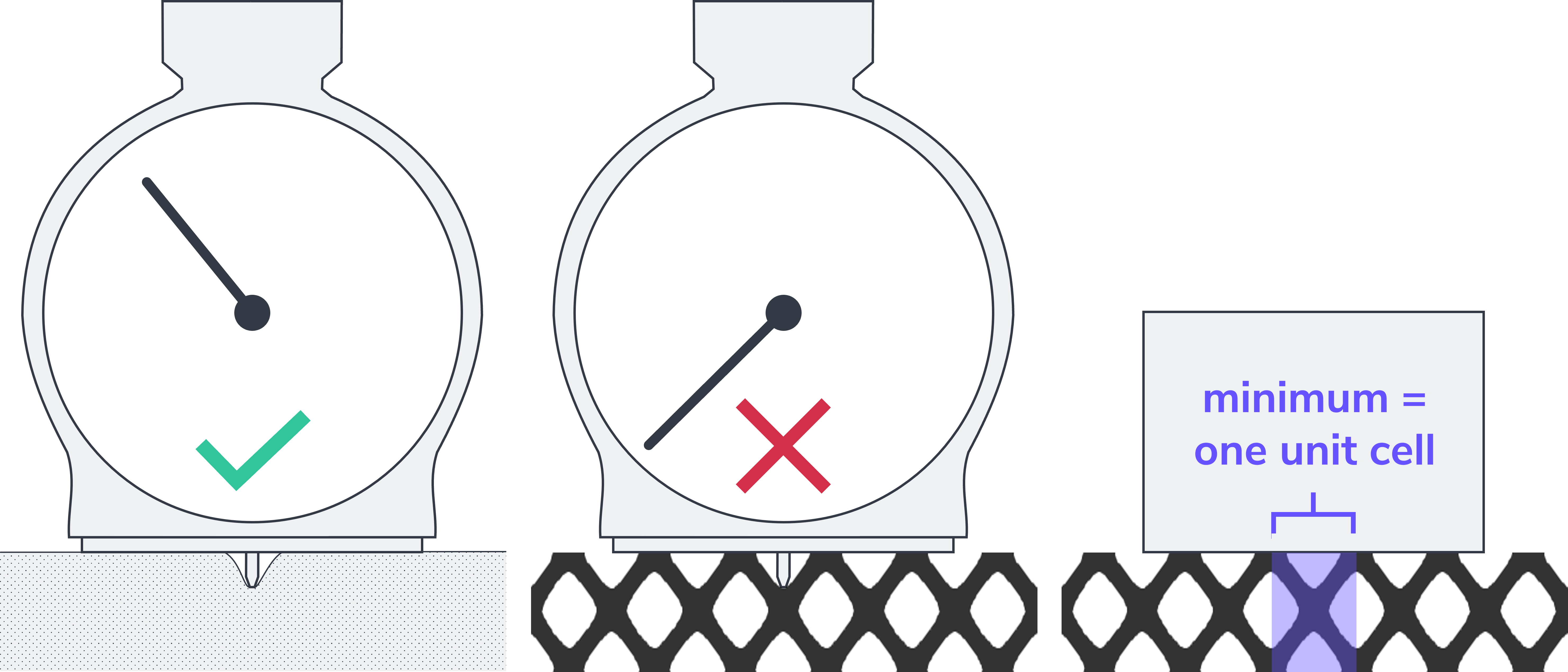
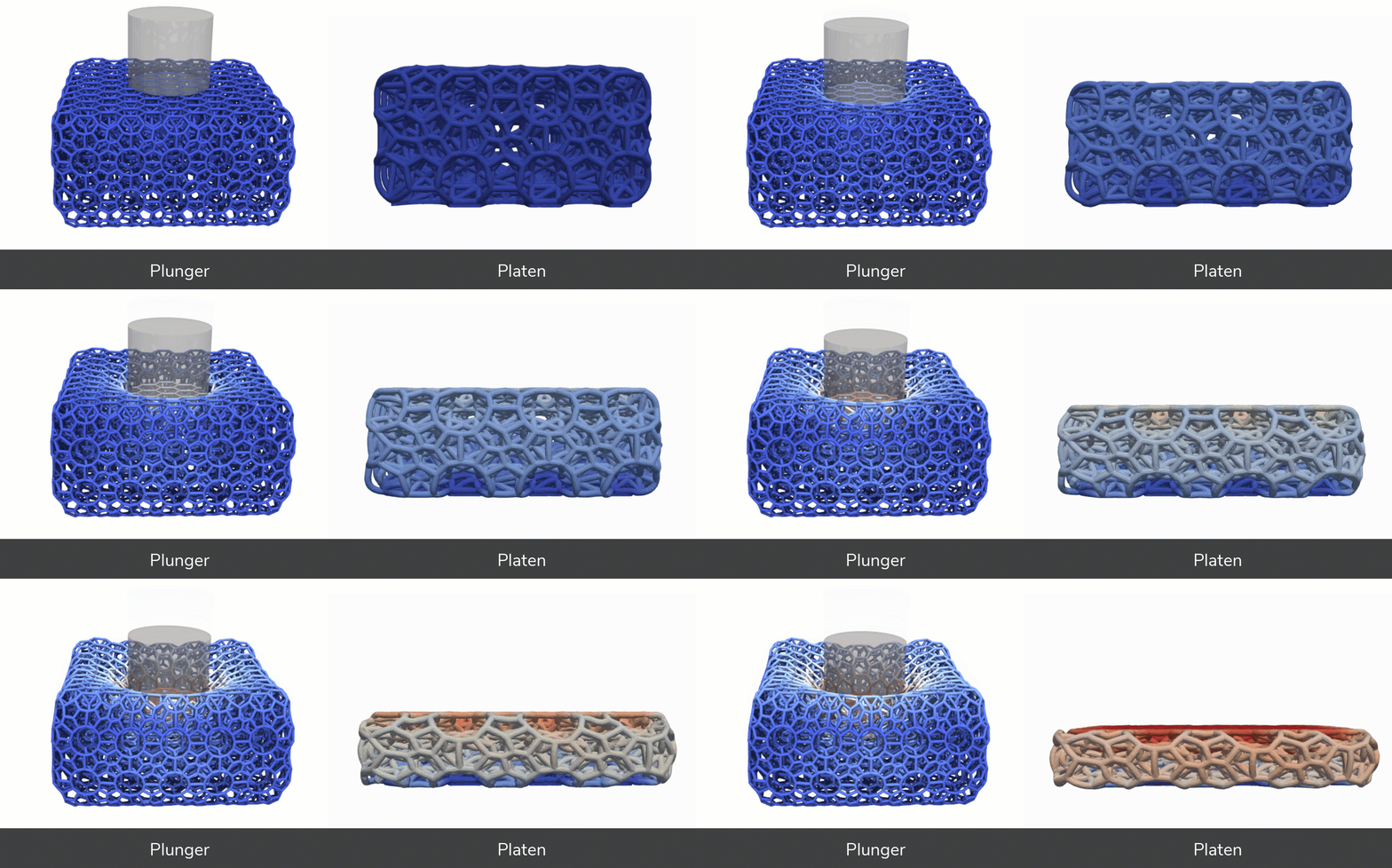
Shore hardness is measured with a durometer, which uses a small pin as the testing plunger, and provides a unitless measure of hardness via a dial or digital readout. The pin plunger is very small, ranging in diameter between 1.1 - 1.4 mm. As illustrated below, a lattice can miss the measurement entirely as the pin falls in the negative space between struts. Even if the durometer pin hits a strut to get a reading, the pin is too small to get an accurate sense of how the lattice is performing, which relies on how the struts work together as a unit. Testing lattice compression requires a platen or plunger that spans across one unit cell at a minimum, ideally multiple unit cells.
The pin applies a load to a depth of 0-2.5 mm, which most closely aligns with the modulus measurement used in Design Engine. If you are trying to match a material where you only have shore hardness data to pull from, you can approximate the roughly similar modulus metric via a conversion formula provided below.
::File{src="https://api.archbee.com/api/presign/3CesIL2dYMCHPZvRjp8S0/_ZeFOTTUz_3Bbdn4F88x8_convert-shore-hardness-to-modulus.xlsx" label="Convert Shore Hardness to Modulus.xlsx"}
:::hint{type="info"}
Note this conversion is approximate and should be considered a rough correlation only. The formula uses A.N Gent's equation for ASTM D2240 Type A durometer hardness.
:::
::::
### Qualitative Comparisons
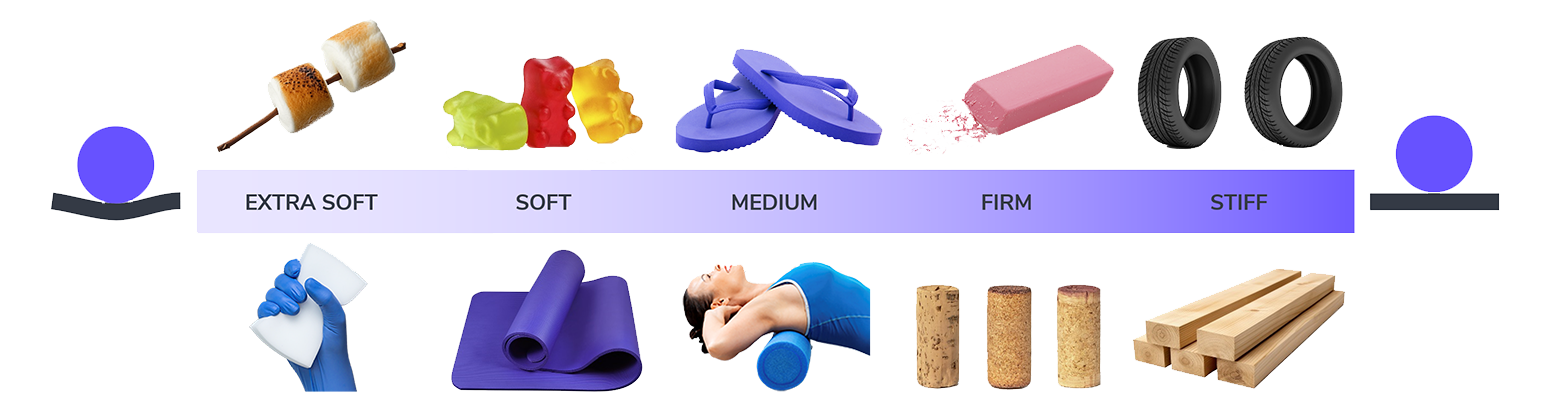
You may not have a quantitative performance metric in mind, and that's okay. Many designers approach lattices with other known materials in mind or just want to know **what ballpark their application falls in** to get started with lattice design. Below are some examples of common materials to give you a rough range of **stress at 25% strain** to help you gauge the stiffness of your lattice design in a qualitative comparison.
| | Extra Soft | Soft | Medium | Firm | Stiff |
| ------------------------------ | --------------------------------------------------------------------- | --------------------------------------------------------------------------------------------------- | ---------------------------------------------------------------------- | ------------------------------------------------------------------------------------------------- | --------------------- |
| **Stress at 25% Strain** (kPa) | 0 - 20 | 20 - 80 | 80 - 200 | 200 - 1000 | 1000+ |
| **Reference Materials** | `Marshmallows`
`Melamine Sponge` | `Gummy Bears`
`Yoga Mat` | `Flip-flops`
`Foam Roller` | `Eraser`
`Cork` | `Tires`
`Lumber` |
| **Reference Foams** | `Memory`
`Latex`
`Packing`
`High Density Polyurethane` | `Rebond`
`Neoprene`
`EVA`
*Foam similar to* `Poron XRD` | `VN600`
*Foam similar to* `D3O Aero` | `EPS`
`VN740`
*Foam similar to* `D3O Decell`
`VN1000` | |
| **DLS Production** | Material-dependent | Good | Good | Good | Often too dense |
| **Applications** | Comfort | Comfort | Supportive | Protective | Rigid |
:::hint{type="info"}
If you have a particular foam in mind that you are trying to replicate, see the [Foam to Lattice Workflow](docId\:LlWKO8SuVfs2j3cEjz6YR) example below.
:::
:::hint{type="warning"}
Note that combining lattices with skins or using thicker boundary struts than the body of the lattice, can make the structure feel slightly stiffer in performance.
:::
## Lattice Parameter Filters
Standard lattice parameters can also be used to filter down results.
::::VerticalSplit{layout="middle"}
:::VerticalSplitItem
### Cell Size
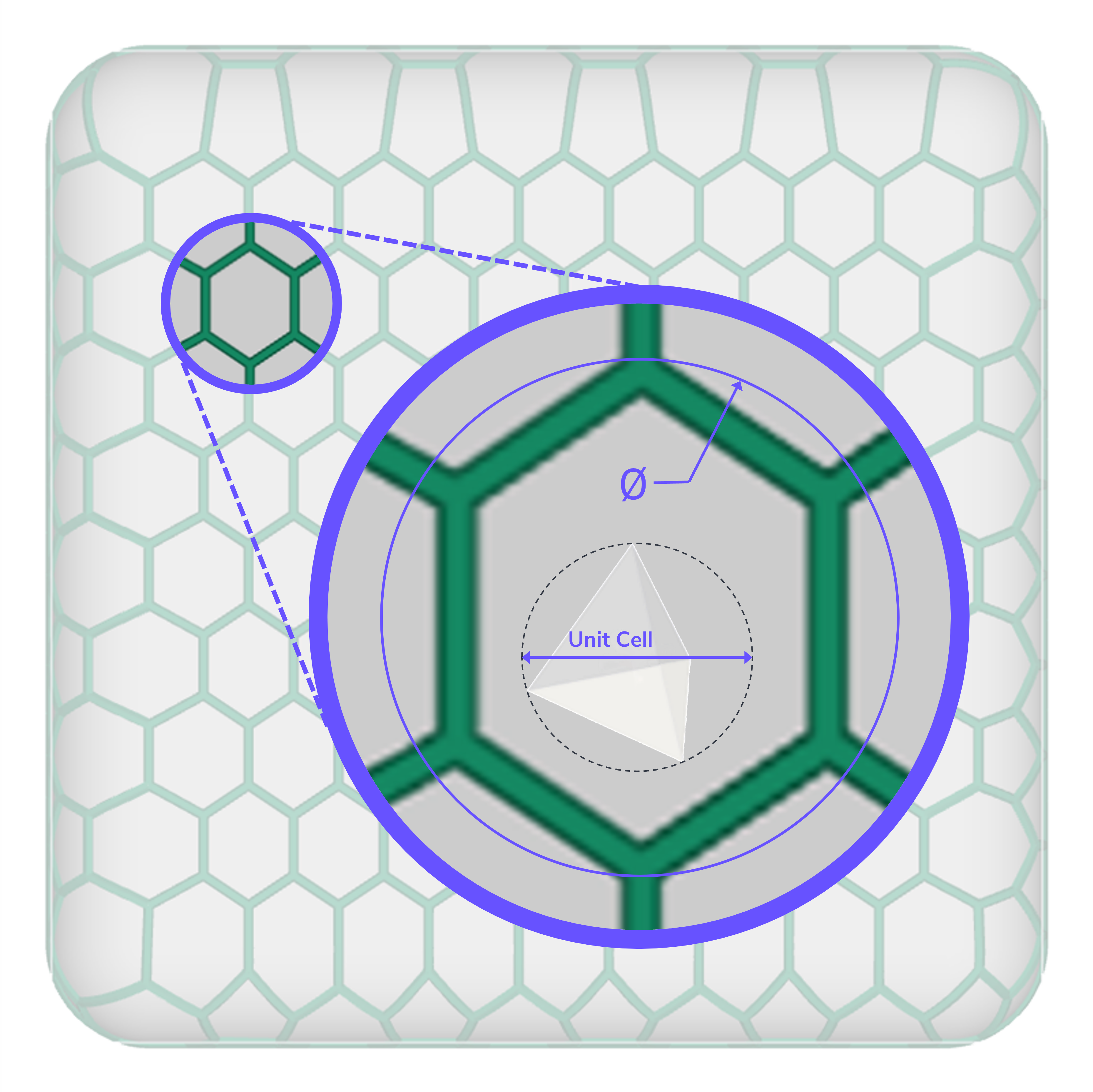
Narrow the cell sizes that appear in search results based on your part geometry and manufacturability.
:::
:::VerticalSplitItem
### Strut Diameter
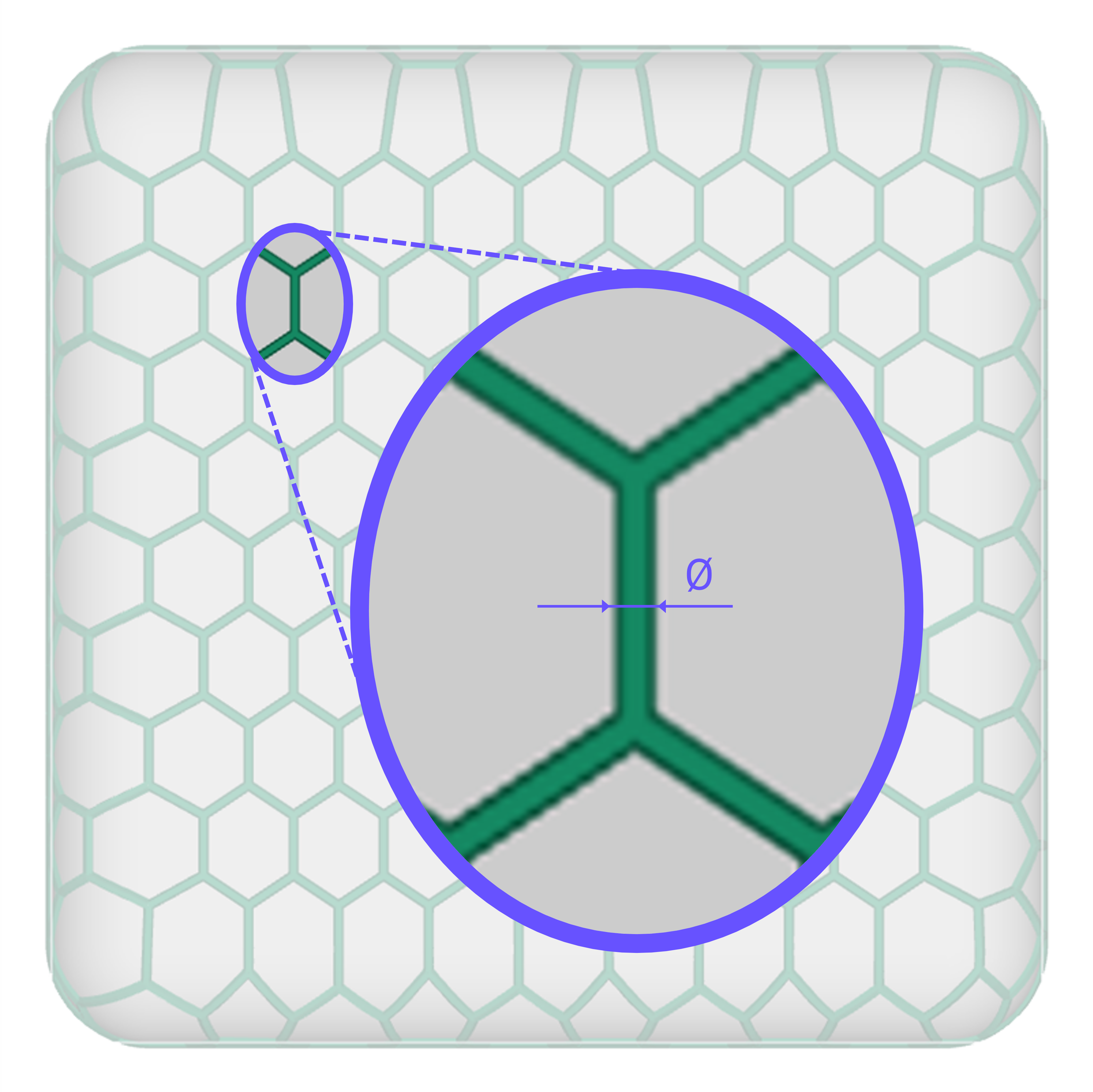
Narrow the strut diameters that appear in search results based on your material.
:::
::::
### Lattice Type
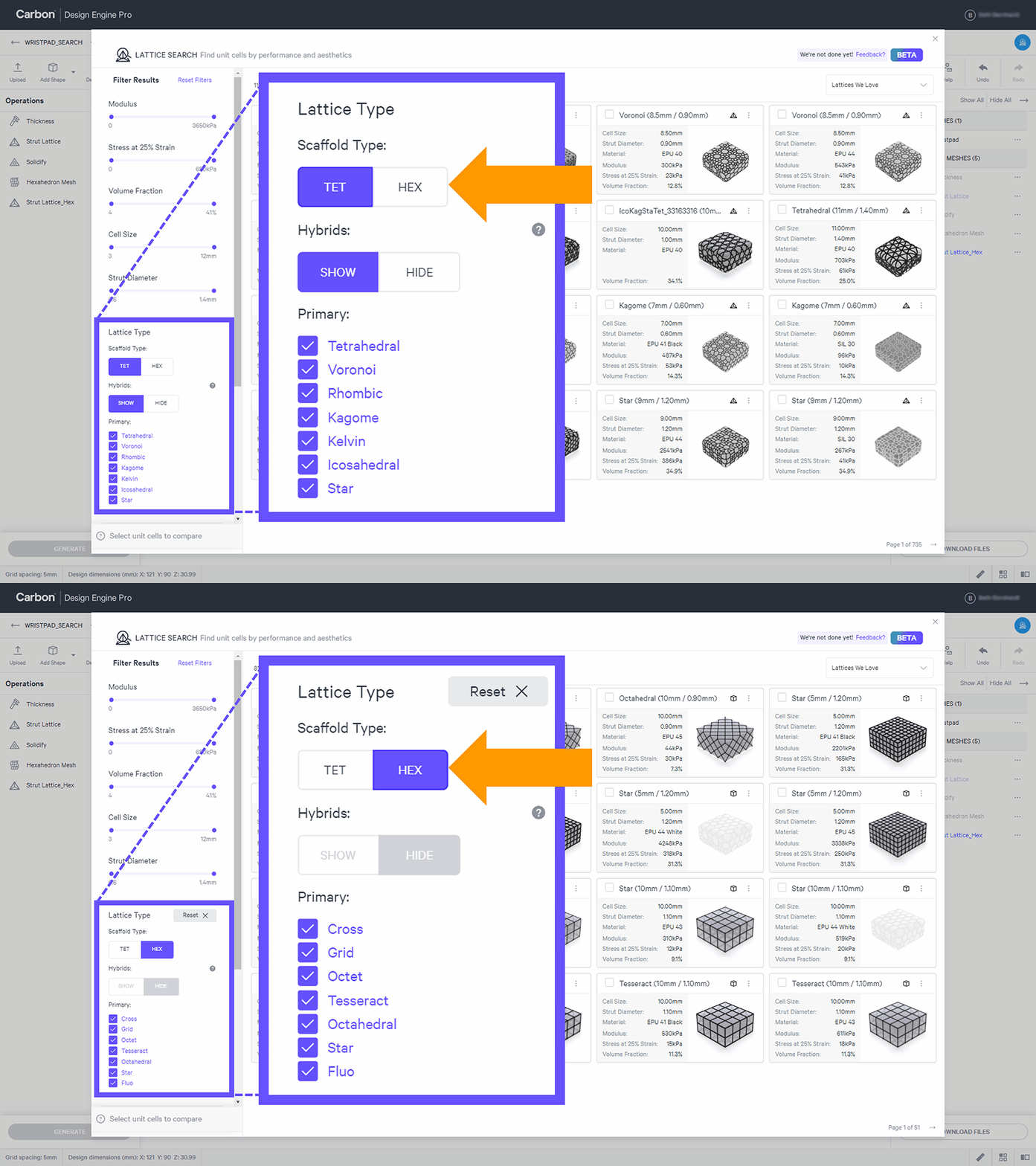
Lattice Search catalogs lattice types for both** tetrahedron mesh **and** hexahedron mesh scaffold types**.
::::VerticalSplit{layout="left"}
:::VerticalSplitItem
**Scaffold Type**
Toggle between tet and hex scaffold type to search per mesh preference.
Hybrids are only available for tet mesh types.
The primary lattice types available will vary to match the selected scaffold type.
:::
:::VerticalSplitItem
:::
::::
**Tet Lattice Types**
There are more options than just the five primary tet lattice types available in the Strut Lattice operation.
- Two additional tet lattice types appear in the library: **Kelvin (Tet) **and** Star (Tet)**
- **Hybridized lattice types **are also available in many combinations
::::VerticalSplit{layout="left"}
:::VerticalSplitItem

:::
:::VerticalSplitItem
**Hybrid Lattice Types**
Hybridized lattices are available using all seven tetrahedron lattice types:
Icosahedral | Kagome | Kelvin (Tet) | Rhombic | Star (Tet) | Tetrahedral | Voronoi
- The example here is 1/3 Star and 2/3 Voronoi. The unit cells of each type merge together to create a unique unit cell in the noted proportions.
- Hybrid lattices are **named by their components**, using the first three letters of each lattice type, followed by their proportions as a percentage.
- In this example: **StaVor\_3366**
:::
::::
**Hex Lattice Types**
:::hint{type="danger"}
To create a lattice using a Hex Mesh, you must generate the Hex Mesh via the [Hex Mesh](docId:2s1MLNX3Yfvzt6F5Rge5h) operation **before** you can select and apply unit cell parameters via the Strut Lattice operation.
:::
::::VerticalSplit{layout="middle"}
:::VerticalSplitItem
:::
:::VerticalSplitItem
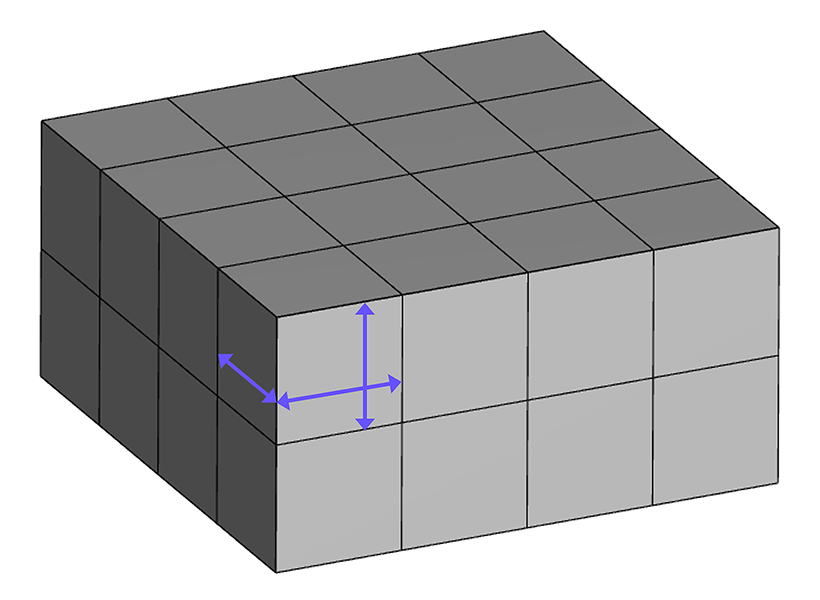
Lattice Search assumes a **gridded Hex Mesh** with **equal XYZ** hexahedron dimensions.
This equal-sided cuboid is **the cell size** of the strut lattice unit cell shown in the meta-materials library (MML).
When reviewing lattice performance in the MML, reference the closest approximate cell size to your hex mesh.
:::
::::
:::hint{type="warning"}
Note that when using the **apply unit cell** option when launching Lattice Search directly from the Strut Lattice operation, the **cell size will not be applied**, as the cell size of your Hex Mesh will be used. Only the lattice type and strut diameter will carry through.
:::
:::hint{type="warning"}
Your actual hex lattice performance may vary depending on the [type of hex mesh](docId\:f-f8ROxDabcRrBEUDh6Q1) you use and the size and proportions of the hexahedrons in your hex mesh.
:::
:::hint{type="info"}
Note that there is a **Star** lattice type available for both tet and hex scaffold types.
:::
### Material
**Elastomers**
The metamaterials library currently catalogs lattices in Carbon's elastomeric materials:
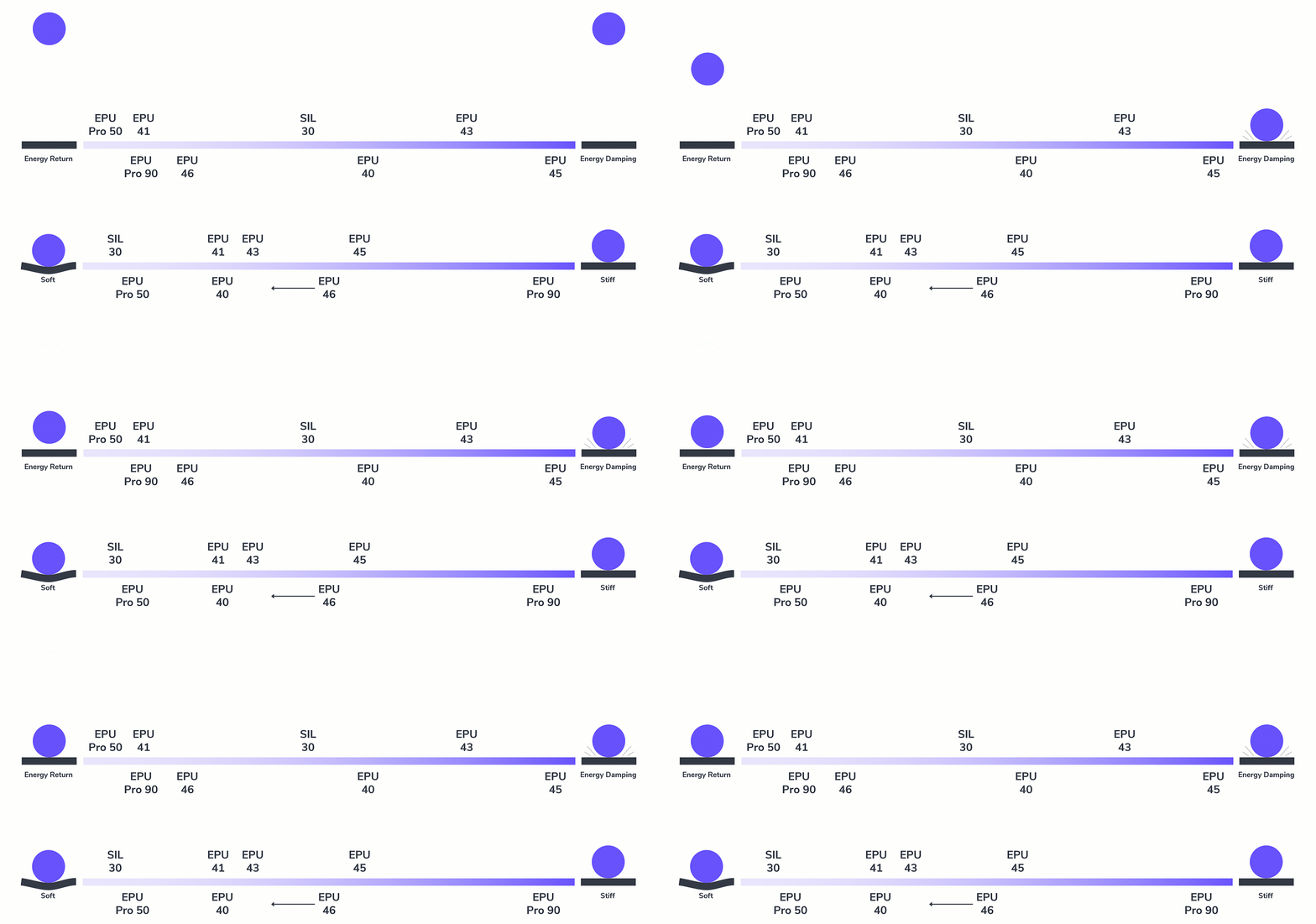
**Energy Return to Damping**
EPU Pro 50 | EPU Pro 90 | EPU 41 | EPU 46 | SIL 30 | EPU 40 | EPU 43 | EPU 45
**Soft to Stiff**
SIL 30 | EPU Pro 50 | EPU 41 | EPU 40 | EPU 43 | EPU 46 (tunable stiffness) | EPU 45 | EPU Pro 90
:::hint{type="info"}
For more guidance and manufacturability information, reference the [Lattice Parameters](docId\:f-f8ROxDabcRrBEUDh6Q1) lesson.
:::
# Lattice Search Demo
::embed[]{url="https://vimeo.com/723872614"}
:::ExpandableHeading
Video Text
1. **Measure Part Geometry**
• Measure part - using Thickness tool in this example
• Follow guidelines to find a main cell size range
• \~20 mm smallest dimension = \~15 mm max cell size
2. **Strut Lattice - Lattice Search**
• Select input mesh
• Select Lattice Search under lattice type
3. **Filter Results**
• Adjust modulus for pre-yielding stiffness
• Adjust stress at 25% strain for pre-densification stiffness
• Adjust volume fraction to make your lattice more or less dense
• Adjust to acceptable cell size range for your geometry
• Adjust strut diameter to acceptable range for material
• Include or hide hybrid lattice types
• Select which lattice types to include
• Select materials* (currently elastomers)*
4. **Browse Results**
• Sort Results
• Select lattices to compare details
• Compare up to 6 lattices
• Compare stress-strain curves in graph view
• Data may be downloaded as a CSV
• Compare lattice patterns in model view
• Sample pucks are 40 x 40 x 20 mm
5. **Select a Lattice**
• Select option - applying all unit cell parameters in this example
6. **Generate and Assess Lattice**
7. **Apply Options and Solidify**
• Adjust advanced options as needed
• Solidify for a printable mesh
:::
:::hint{type="warning"}
Note that using **Lattice Search for a zone **will only apply the **lattice type **to the zone, rather than all unit cell parameters.
:::
:::hint{type="info"}
When performance data is not available within the metamaterials library, a button to request performance data is available within the Strut Lattice tool.
:::
# Foam to Lattice Workflow
One of the key challenges that designers face when designing with a lattice is not having a clear path to mimic the mechanical performance and aesthetics desired. Searching a vast library can be a daunting task if you don't have specific performance criteria in mind.
A common path in lattice design is to have foam characteristics in mind as a benchmark for finding lattices that perform in a similar capacity.
## Compare to Foams in Library
Carbon tested a cross section of common foams to capture data in the same format as the library's lattice simulation data, to provide a reference point for finding unit cells. For more details on Carbon’s testing and data modeling, reference this [white paper](https://www.carbon3d.com/resources/blog/carbon-design-engine-helps-engineers-improve-on-favorite-foams).
::::VerticalSplit{layout="left"}
:::VerticalSplitItem
### Filter by Foam
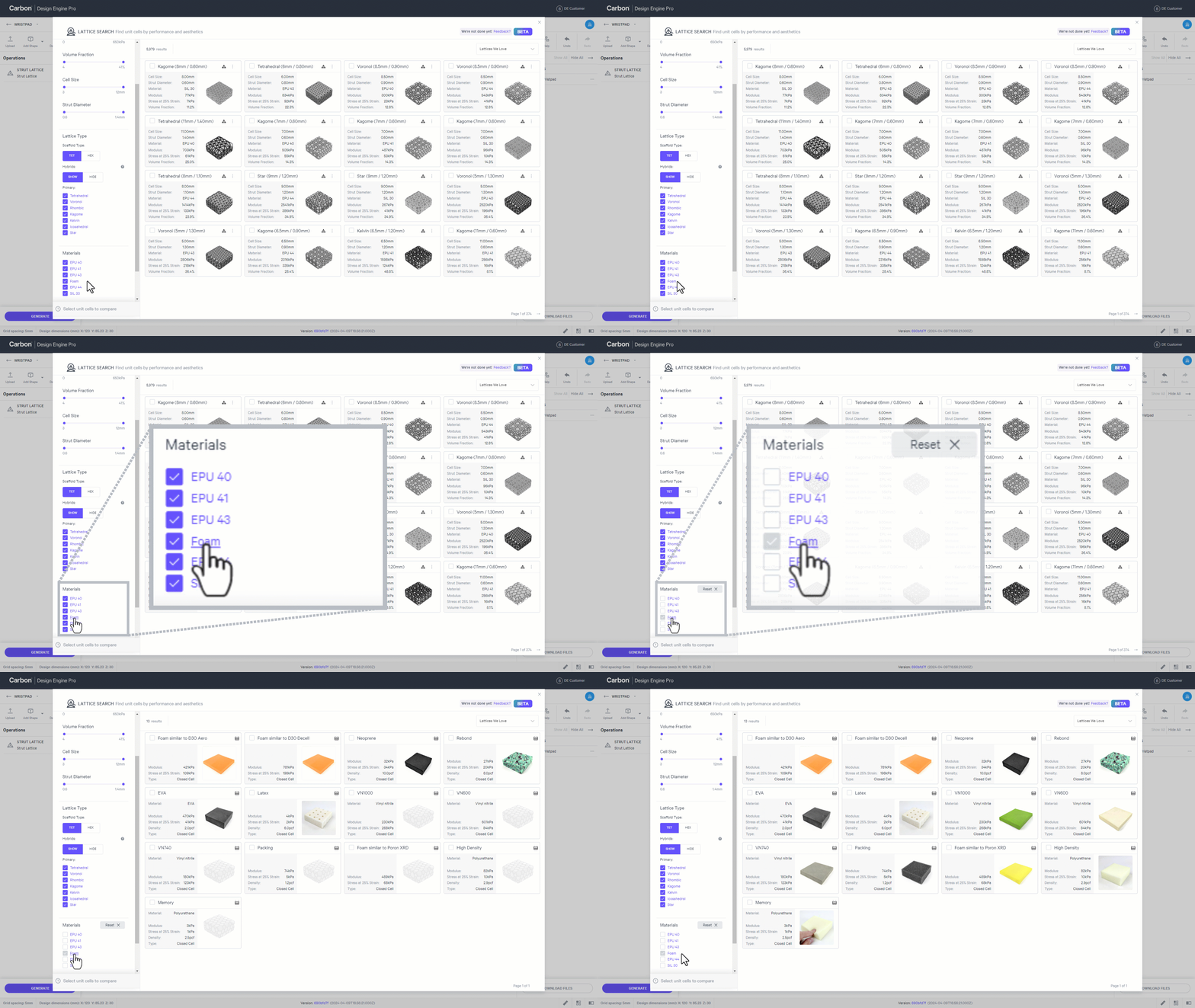
In the **materials **filter, click on **foam **to see all foams available in the metamaterials library.
:::
:::VerticalSplitItem
:::
::::
### Generic Foam Details
Several of the foams we tested are from broad generic categories. To provide more context, below are the retailer specifications for these foams.
| **Generic Foam** | **Common Application** | **Retailer Specs** |
| --------------------------- | ----------------------- | ---------------------------------------------------------------------- |
| **Closed Cell Foam (EVA)** | Exercise Mats | EVA Foam "Firm"
Density: 2.0 pcf (0.032 g/cc) |
| **High Density Foam** | Furniture Cushions | EverFlex V54 54 ILD (240 N)
Density: 2.9 pcf (0.046 g/cc) |
| **Latex Foam** | Mattresses and Cushions | N28 28 ILD (125 N)
Density: 6 pcf (0.096 g/cc) |
| **Memory Foam** | Mattresses and Cushions | 13 ILD (58 N)
Density: 2.5 pcf (0.040 g/cc) |
| **Neoprene Foam** | Gaskets | 3 psi to compress 25% (20.7 kPa\*)
Density: 10.0 pcf (0.160 g/cc) |
| **Packing Foam** | Packing/Shipping | Y37ch Foam 35 ILD (156 N)
Density: 1.2 pcf (0.019 g/cc) |
| **Rebond Foam** | Carpet Padding | 90 ILD (400 N)
Density: 8.0 pcf (0.128 g/cc) |
*\* Results of Carbon testing did not match retailer specs. Testing conditions may vary results.*
### Foam to Lattice Search
::::WorkflowBlock
:::WorkflowBlockItem
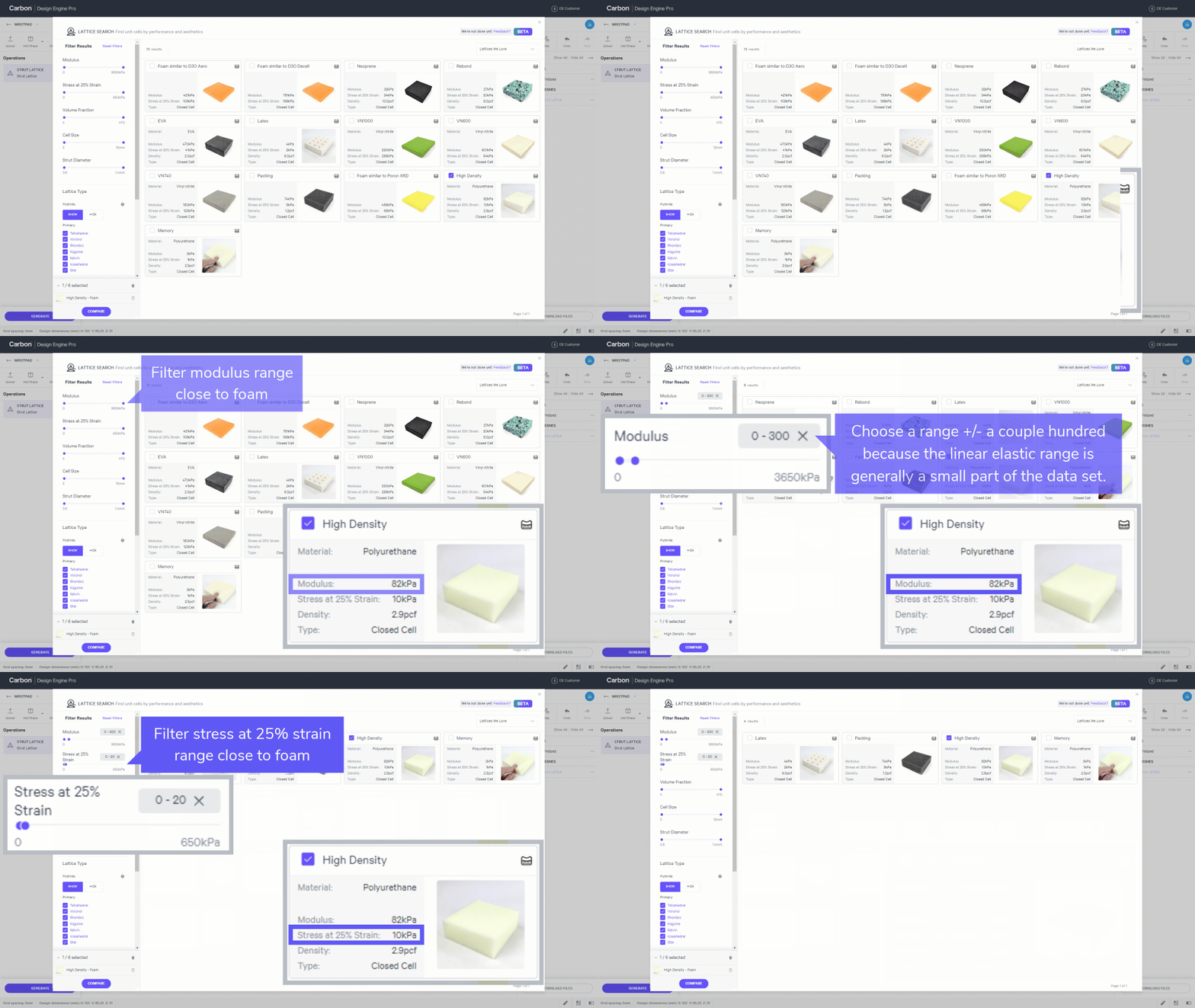
**Filter Foam Performance**
- **Select foam **to match
- Check the box to compare
- Filter **modulus **range close to foam
- Choose a range +/- a couple hundred because the linear elastic range is generally a small part of the data set.
- Filter **stress at 25% strain **range close to foam
- Choose a tight range for best results
:::
:::WorkflowBlockItem
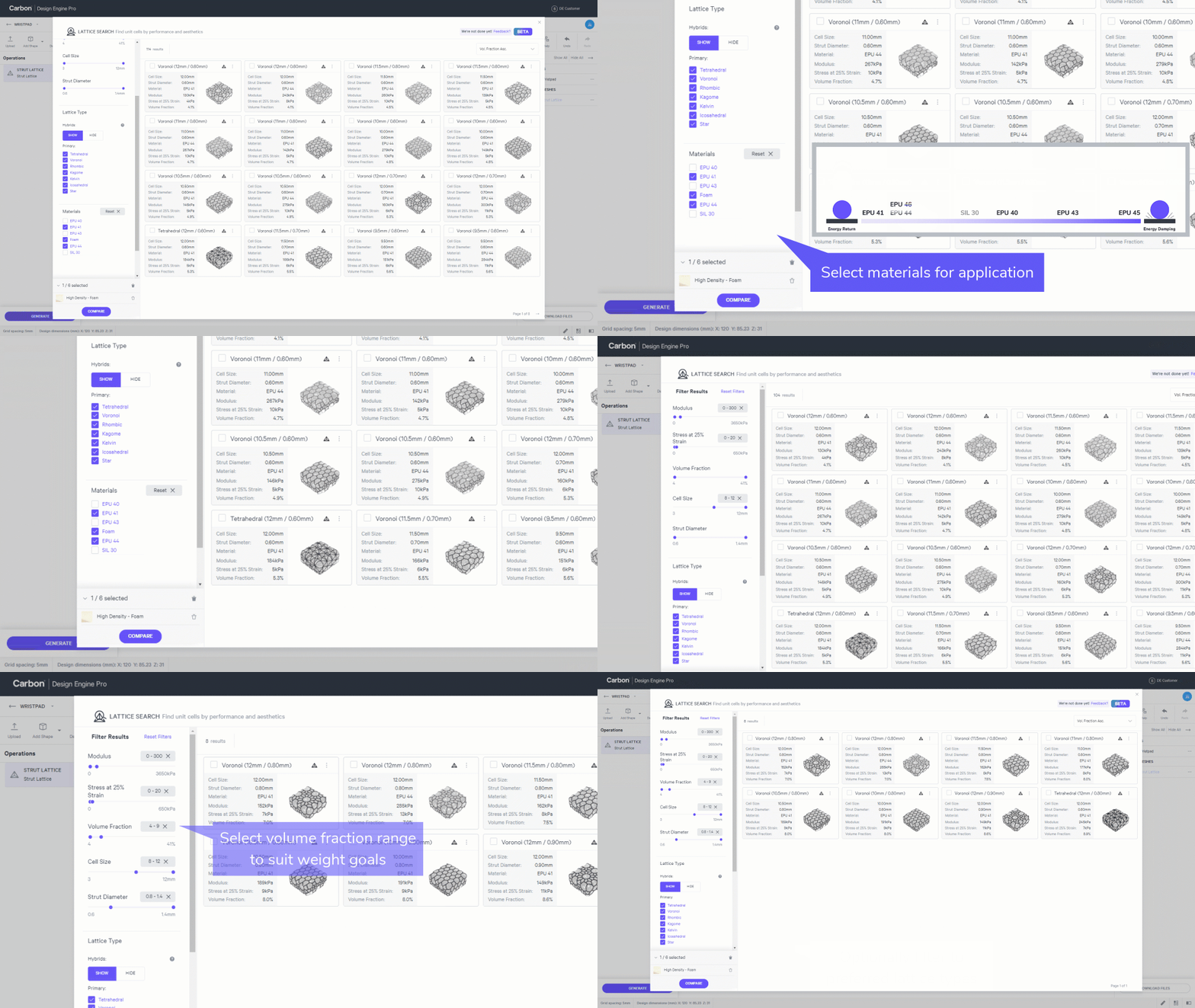
**Filter Lattice Parameters**
- Select **materials **for application
- Energy return in example
- Select **cell size **range to suit geometry
- Select **strut diameter **range to suit resin and cell size range
- Select **volume fraction **range to suit weight goals
- Optionally filter to preferred **lattice types**
:::
:::WorkflowBlockItem
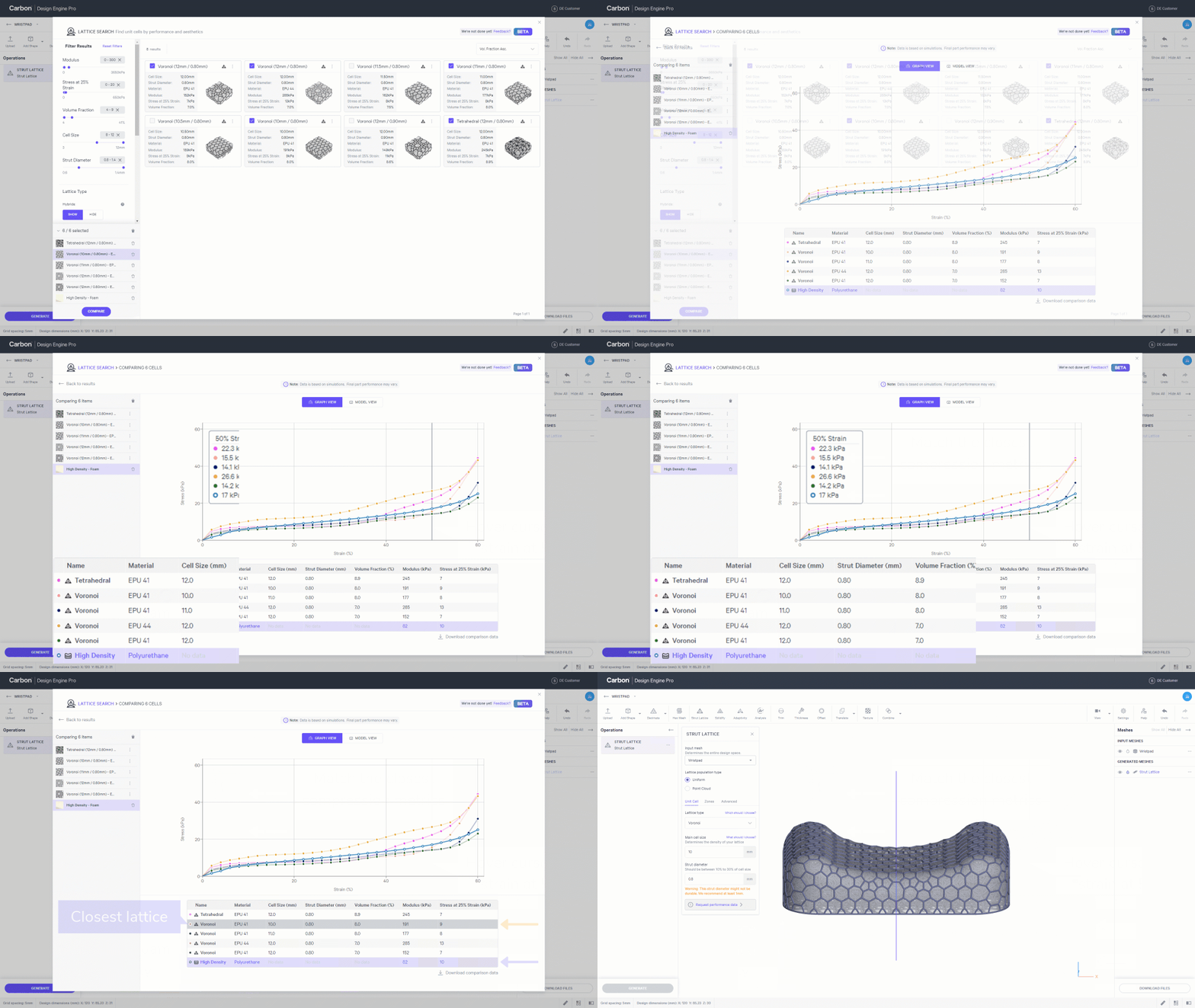
**Compare Results**
- Select up to 5 options to **compare **foam
- **Highlight foam **for clarity
- Hover cursor over **strain at 50%**
- **Match **the closest compression metrics
- Closest lattice
- **Apply unit cell **to generate strut lattice
:::
:::WorkflowBlockItem
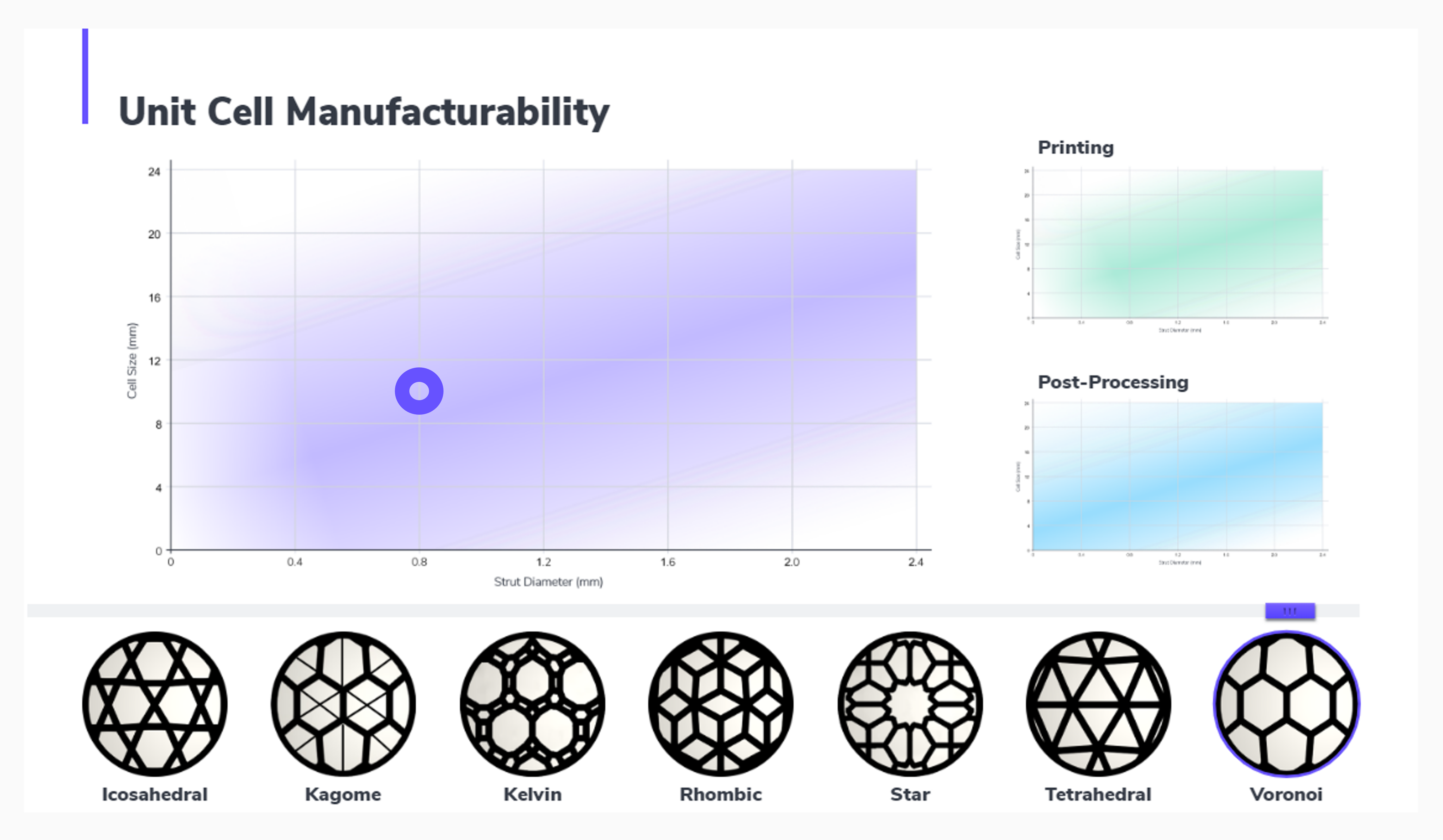
**Check Unit Cell Manufacturability**
In this example, **Voronoi** with a **10mm cell size** and **0.8mm strut diameter** closely matches our high density foam.
- Check that the unit cell conforms well to your design space
- Verify **manufacturability **for the unit cell
- In this case, the parameters are well within the range of Voronoi's manufacturability in Carbon's DLS production
:::
::::
:::hint{type="info"}
For manufacturability information for tet lattices, reference [Unit Cell Manufacturability](docId\:f-f8ROxDabcRrBEUDh6Q1).
:::
## Compare to Other Foams
**Align Data**
If you have your own foam testing data, you may need to align your data to match the format in Design Engine before comparing data.
::::::WorkflowBlock
:::WorkflowBlockItem
**Stress - Strain**
Data may be in **Force (N) - Displacement (mm) **units rather than **Stress(kPa) - Strain (%)**. The same curve may appear slightly different when plotted in different units, which can throw off your search results.

:::
:::::WorkflowBlockItem
**Stress**
::::VerticalSplit{layout="left"}
:::VerticalSplitItem
Divide force by the surface area of the testing apparatus on the sample.
:::
:::VerticalSplitItem
:::
::::
:::::
:::::WorkflowBlockItem
**Strain**
::::VerticalSplit{layout="left"}
:::VerticalSplitItem
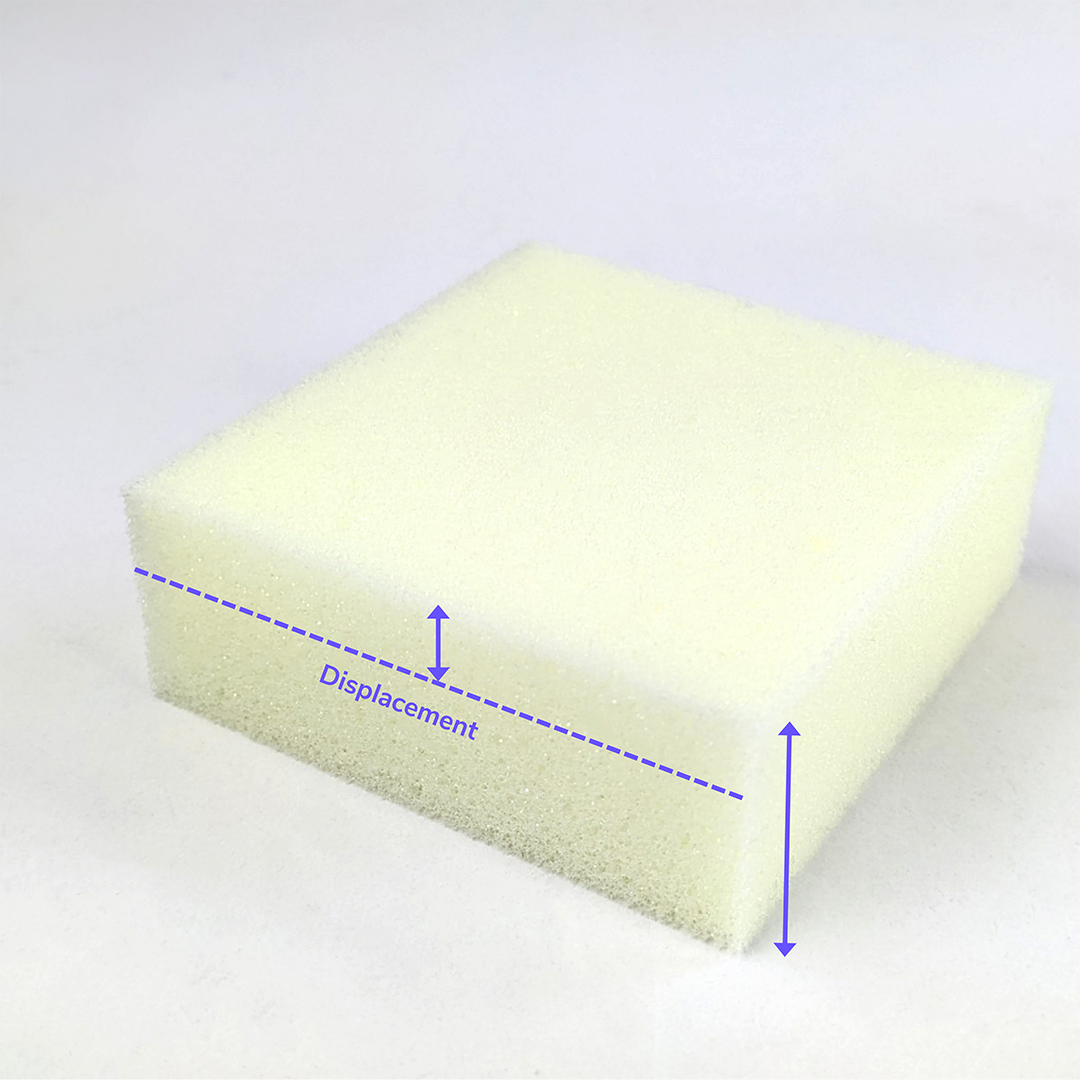
Convert the displacement dimension to a percentage of the sample thickness.
:::
:::VerticalSplitItem
:::
::::
:::::
:::WorkflowBlockItem
**Plot Curve and Compare to Lattices**
- Plot stress-strain curve
- Plot data points at 2, 4, 6... 60% strain to match Design Engine graphs
- Use the cycle 2 curve if you have multiple cycles
- Perform a lattice search per the [foam to lattice workflow](docId\:LlWKO8SuVfs2j3cEjz6YR) above
:::
::::::