---
title: Pac-Dent Rodin Titan
slug: materials/pac-dent-rodin-titan
description: Discover the capabilities of Pac-Dent Rodin Titan, an advanced Class II ceramic nanohybrid resin engineered for full arch dental restorations and provisional hybrid dentures. This comprehensive document includes essential resources.
docTags:
createdAt: 2025-01-28T17:47:33.901Z
---
# Overview
::::VerticalSplit{layout="right"}
:::VerticalSplitItem
**Pac-Dent Rodin® Titan** is a new resin designed for full arch dental restorations and provisional hybrid dentures. It combines the mechanical strength of its previous version with significantly increased flexibility for exceptional impact resistance. This Class II ceramic nanohybrid resin, with over 51% ceramic filler content, maintains high performance and aesthetics. Its modified flexibility is specifically optimized for printing high-quality full arch restorations for various denture designs, including monolithic and screw-retained options.
:::
:::VerticalSplitItem

:::
::::
Carbon has validated the following shades: A1, A2, A3, B1, C2, OM1 and OM3
:::hint{type="info"}
This resin is not currently compatible with the [AO Polishing Cassette](docId\:iFFh3q8-WLk-LIqr87bd5).
:::
## Resource Links
::::LinkArray{contentSource="CUSTOM"}
:::LinkArrayItem{headerType="IMAGE" headerImage="https://api.archbee.com/api/optimize/uXbZOKjJTGpPhjapQ8fvM-IOQIJkNnkbUAw9Q-ap1FV-20241115-235121.jpg"}
**[About the Material](https://www.carbon3d.com/materials/rodin-titan)**
:::
:::LinkArrayItem{headerType="IMAGE" headerImage="https://api.archbee.com/api/optimize/3CesIL2dYMCHPZvRjp8S0/cJAKqDDnRUAeJAXNRThMm-20251016-221334.png"}
**[Manufacturer Instructions for Use](https://cdn.shopify.com/s/files/1/0117/1488/7761/files/66c37eb3cab9713e0847057f_Rodin_Titan_IFU-041824-1736979715996.pdf)**
:::
:::LinkArrayItem{headerType="IMAGE" headerImage="https://api.archbee.com/api/optimize/3CesIL2dYMCHPZvRjp8S0/1r3fpdvMUMFVZGfey2Tjn-20251016-221405.jpg"}
**[Safety Data Sheet](https://cdn.shopify.com/s/files/1/0117/1488/7761/files/SDS_-RODIN_Denture_Base_2.0_Resin-1741130150418.pdf)**
:::
::::
### Protocol
This downloadable handout provides important usage information, including instructions about storage and post-processing. Print it out and bring it into the lab!
::File{src="https://api.archbee.com/api/presign/3CesIL2dYMCHPZvRjp8S0/bk1qoh_aqNESOBar-S12C-20260105-192723.pdf" label="Pac-Dent Rodin Titan Protocol v0101.pdf"}
# Design
See IFU above for manufacturer design recommendations.
# Digital Preparation
***
### Connect to Printer
::::VerticalSplit{layout="left"}
:::VerticalSplitItem
Connect to the printer software using your web browser.
:::
:::VerticalSplitItem
::Image[]{src="https://res.cloudinary.com/carbon3d/image/upload/t_auto_quality_format/Education/Materials/dental/__General_Use/Connect-printer_thumbnail.png" size="70" width="774" height="319" darkWidth="774" darkHeight="319" position="flex-start" alt="Connect to Printer" showCaption="false"}
:::
::::
::::::::ExpandableHeading
*Expand for steps*
:::::::WorkflowBlock
:::::WorkflowBlockItem
::::VerticalSplit{layout="middle"}
:::VerticalSplitItem
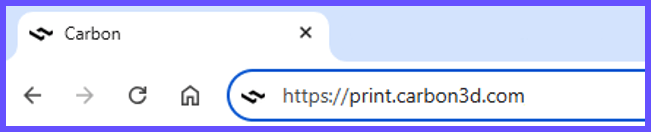
**Open browser**
Enter [https://print.carbon3d.com](https://print.carbon3d.com/) in the URL field.
:::
:::VerticalSplitItem
:::
::::
:::hint{type="info"}
Latest version of Chrome recommended.
:::
:::::
:::::WorkflowBlockItem
::::VerticalSplit{layout="middle"}
:::VerticalSplitItem
If you are not automatically logged in, enter your email and password and **click Log In****.**
:::
:::VerticalSplitItem
::Image[]{src="https://res.cloudinary.com/carbon3d/image/upload/t_auto_quality_format/Education/Materials/dental/__General_Use/Connect-login.png" size="60" width="561" height="677" darkWidth="561" darkHeight="677" position="center" alt="Carbon Log In" showCaption="false"}
:::
::::
:::::
::::::WorkflowBlockItem
:::::VerticalSplit{layout="middle"}
::::VerticalSplitItem
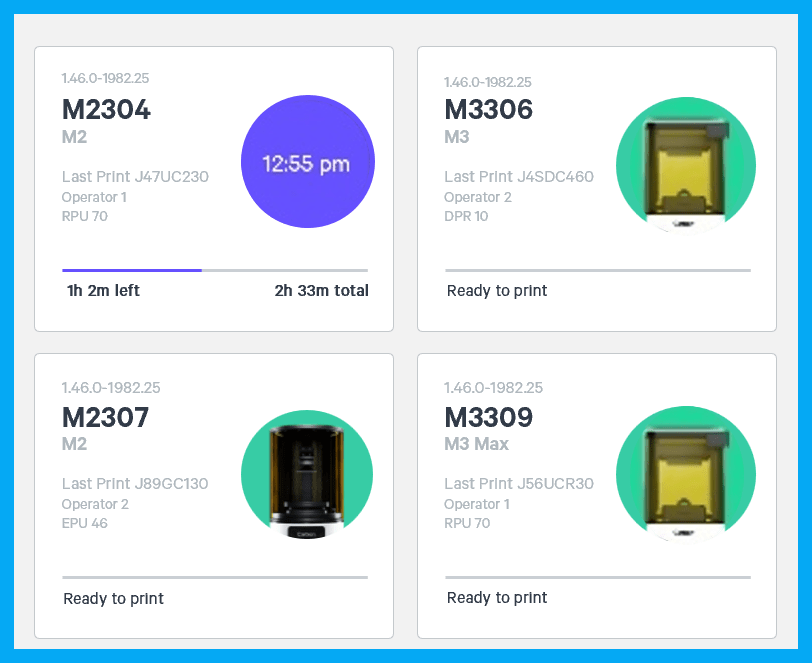
If you have multiple printers, **select the printer** that you wish to use to create the project.
:::hint{type="info"}
You may queue the build to other printers.
:::
::::
:::VerticalSplitItem
:::
:::::
::::::
:::::::
::::::::
***
### Create Project
::::VerticalSplit{layout="left"}
:::VerticalSplitItem
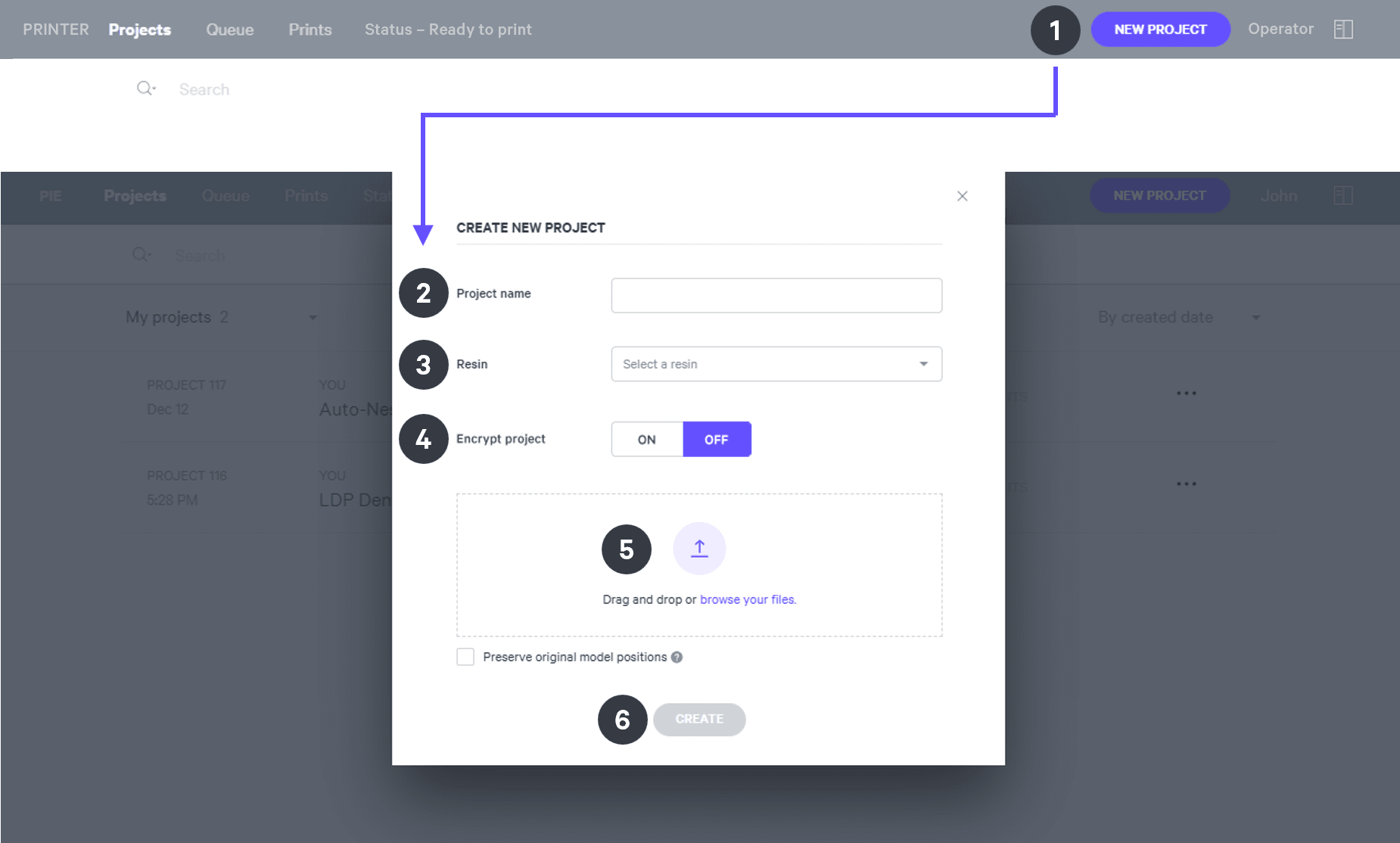
After you have chosen the printer, you must create a new project.
:::
:::VerticalSplitItem
::Image[]{src="https://res.cloudinary.com/carbon3d/image/upload/t_auto_quality_format/Education/Materials/dental/__General_Use/Create-project_thumbnail.png" size="70" width="673" height="247" darkWidth="673" darkHeight="247" position="flex-start" alt="Create Project" showCaption="false"}
:::
::::
::::::ExpandableHeading
*Expand for steps*
:::::WorkflowBlock
:::WorkflowBlockItem
Click **New Project.**
You can also drag your files from a file browser window and drop it on top of the **New Project** icon.
:::
:::WorkflowBlockItem
Enter a new **Project name.**
:::
:::WorkflowBlockItem
In the Resin dropdown, select **your resin.**
:::
::::WorkflowBlockItem
Only use [Encrypt project](docId:1bT3mas8msvxq9CDza67C) if you want to require a password to access the project.
:::hint{type="warning"}
**Carbon cannot provide support** for encrypted projects.
:::
::::
:::WorkflowBlockItem
**Drag and drop** your part files into the dotted box or click **browse your files **and select them in a file browser window.
:::
:::WorkflowBlockItem
Click **Create**
After a few moments you will see the project printer interface with your parts on the platform.
:::
:::::
::::::
***
# All-on-x (AOX)
## Orientation
:::hint{type="info"}
For detailed information about orienting parts, read [Orient](docId\:rMnxtq1NIAHXZOc4bZXWu).
:::
:::hint{type="info"}
**The following information applies to full arches only.**
:::
- Rotate AOX device to be **parallel to the platform** with **occlusal surfaces facing the platform.**
::Image[]{src="https://res.cloudinary.com/carbon3d/image/upload/t_auto_quality_format/v1744838049/Education/Materials/dental/Pac-Dent%20Rodin%20Titan/Aox-orient01.jpg" size="70" width="951" height="549" position="flex-start" showCaption="false"}
:::hint{type="info"}
**Surfaces that have overhangs will require supports. **These supports affect fit and will require finishing to ensure proper seating.
:::
## Supporting
:::hint{type="info"}
See [Supports](docId\:VUbpoAitbLM11aM9-qJ1p) for detailed information.
:::
:::hint{type="info"}
This example demonstrates support of part parallel to the platform.
:::
::::WorkflowBlock
:::WorkflowBlockItem
Select the [Supports](docId\:VUbpoAitbLM11aM9-qJ1p) tab in the top bar or press **Shift + S.**

:::
:::WorkflowBlockItem
In the bottom bar, toggle [Overhang Detection](docId:1bT3mas8msvxq9CDza67C) **on** and set the angle to **40 - 60 degrees.**
::Image[]{src="https://res.cloudinary.com/carbon3d/image/upload/t_auto_quality_format/v1741914659/Education/Materials/dental/__General_Use/overhang-detection02.gif" size="70" width="712" height="278" position="flex-start" showCaption="false"}
:::
:::WorkflowBlockItem
Also in the bottom bar, set [Toggle Platform](docId:1bT3mas8msvxq9CDza67C) to **off.**
::Image[]{src="https://res.cloudinary.com/carbon3d/image/upload/v1741970064/Education/Materials/dental/__General_Use/toggle-platform02.gif" size="70" width="722" height="347" position="flex-start" showCaption="false"}
:::
:::WorkflowBlockItem
Set **Part Position** to **Above.**
::Image[]{src="https://res.cloudinary.com/carbon3d/image/upload/t_auto_quality_format/v1743201611/Education/Materials/dental/__General_Use/part-position-above.jpg" size="70" width="733" height="146" position="flex-start" showCaption="false"}
:::
:::WorkflowBlockItem
Support overhangs with [patches](docId\:VUbpoAitbLM11aM9-qJ1p) and/or [fences](docId\:VUbpoAitbLM11aM9-qJ1p).
- In most cases, Patch is the only tool that will be required.
::embed[]{url="https://vimeo.com/1076230220?dnt=1"}
:::
:::WorkflowBlockItem
Support T-bars with fences.

:::
::::
# Crowns, Bridges and Veneers
## Orientation
:::hint{type="info"}
For detailed information about orienting parts, read [Orient](docId\:rMnxtq1NIAHXZOc4bZXWu).
:::
- Rotate each part so that the **margin and interface are free of overhangs.**
- **Occlusal surfaces should face the platform.**
- Minimize overhangs on buccal/lingual surfaces.
::Image[]{src="https://res.cloudinary.com/carbon3d/image/upload/t_auto_quality_format/v1744925028/Education/Materials/dental/Pac-Dent%20Rodin%20Titan/Crown-bridge-veneer-orient01.png" size="70" width="1424" height="851" position="flex-start" showCaption="false"}
:::hint{type="warning"}
Margins and interfaces that have overhangs will require supports. These supports affect fit and will require finishing to ensure proper seating.
:::
## Supporting
:::hint{type="info"}
See [Supports](docId\:VUbpoAitbLM11aM9-qJ1p) for detailed information.
:::
- Support all overhangs as needed using the [patch](docId\:VUbpoAitbLM11aM9-qJ1p) or [fence](docId\:VUbpoAitbLM11aM9-qJ1p) tools.
::::WorkflowBlock
:::WorkflowBlockItem
Select the [Supports](docId\:VUbpoAitbLM11aM9-qJ1p) tab in the top bar or press **Shift + S.**

:::
:::WorkflowBlockItem
In the bottom bar, toggle [Overhang Detection](docId:1bT3mas8msvxq9CDza67C) **on** and set the angle to **40 - 60 degrees.**
::Image[]{src="https://res.cloudinary.com/carbon3d/image/upload/t_auto_quality_format/v1741914659/Education/Materials/dental/__General_Use/overhang-detection02.gif" size="70" width="712" height="278" position="flex-start" showCaption="false"}
:::
:::WorkflowBlockItem
Also in the bottom bar, set [Toggle Platform](docId:1bT3mas8msvxq9CDza67C) to **off.**
::Image[]{src="https://res.cloudinary.com/carbon3d/image/upload/v1741970064/Education/Materials/dental/__General_Use/toggle-platform02.gif" size="70" width="722" height="347" position="flex-start" showCaption="false"}
:::
:::WorkflowBlockItem
Set **Part Position** to **Above.**
::Image[]{src="https://res.cloudinary.com/carbon3d/image/upload/t_auto_quality_format/v1743201611/Education/Materials/dental/__General_Use/part-position-above.jpg" size="70" width="733" height="146" position="flex-start" showCaption="false"}
:::
:::WorkflowBlockItem
Support overhangs with [fences](docId\:VUbpoAitbLM11aM9-qJ1p) and/or [patches](docId\:VUbpoAitbLM11aM9-qJ1p).
::Image[]{src="https://res.cloudinary.com/carbon3d/image/upload/t_auto_quality_format/v1744931177/Education/Materials/dental/Pac-Dent%20Rodin%20Titan/crown-bridge-veneer-supported.jpg" size="70" width="1130" height="474" position="flex-start" showCaption="false"}
:::
::::
:::hint{type="success"}
Follow the application specific recommendations below.
:::
### Incisors and canines
In addition to supporting overhangs, these teeth require additional supports to maximize accuracy and print success:
- **Secondary fence supports **offset to the **lingual side **of the incisal edge/cusp tip
- **Two rows of fences **on the **labial surface** located at approximately **1/4 and 3/4 of the tooth height**.
The example below shows the additional supports needed on a veneer for an incisor.
**SECONDARY FENCE ON LINGUAL SIDE**
::::VerticalSplit{layout="middle"}
:::VerticalSplitItem

1\. Support overhang at incisal edge with a single fence.
:::
:::VerticalSplitItem

2\. Add secondary fence approximately 1 mm to the lingual side.
:::
::::
::::VerticalSplit{layout="middle"}
:::VerticalSplitItem

3\. Generated supports.
:::
:::VerticalSplitItem

4\. Side view of generated supports.
:::
::::
**TWO FENCES ON THE LABIAL SURFACE**
::::VerticalSplit{layout="middle"}
:::VerticalSplitItem

1\. Labial surface of veneer for incisor.
:::
:::VerticalSplitItem

2\. Add fences approximately 1/4 and 3/4 of the tooth height.
:::
::::
::::VerticalSplit{layout="middle"}
:::VerticalSplitItem

3\. Generated supports.
:::
:::VerticalSplitItem

4\. Side view of generated supports.
:::
::::
**EXAMPLES OF WELL SUPPORTED PARTS**
::::VerticalSplit{layout="middle"}
:::VerticalSplitItem
**Crown**

:::
:::VerticalSplitItem
**Veneer**

:::
::::
::::VerticalSplit{layout="middle"}
:::VerticalSplitItem
**Bridge**

:::
:::VerticalSplitItem
:::
::::
# Denture Try-ins
:::hint{type="info"}
The following information applies to upper and lower denture try-ins.
:::
## Orientation
:::hint{type="info"}
For detailed information about orienting parts, read [Orient](docId\:rMnxtq1NIAHXZOc4bZXWu).
:::
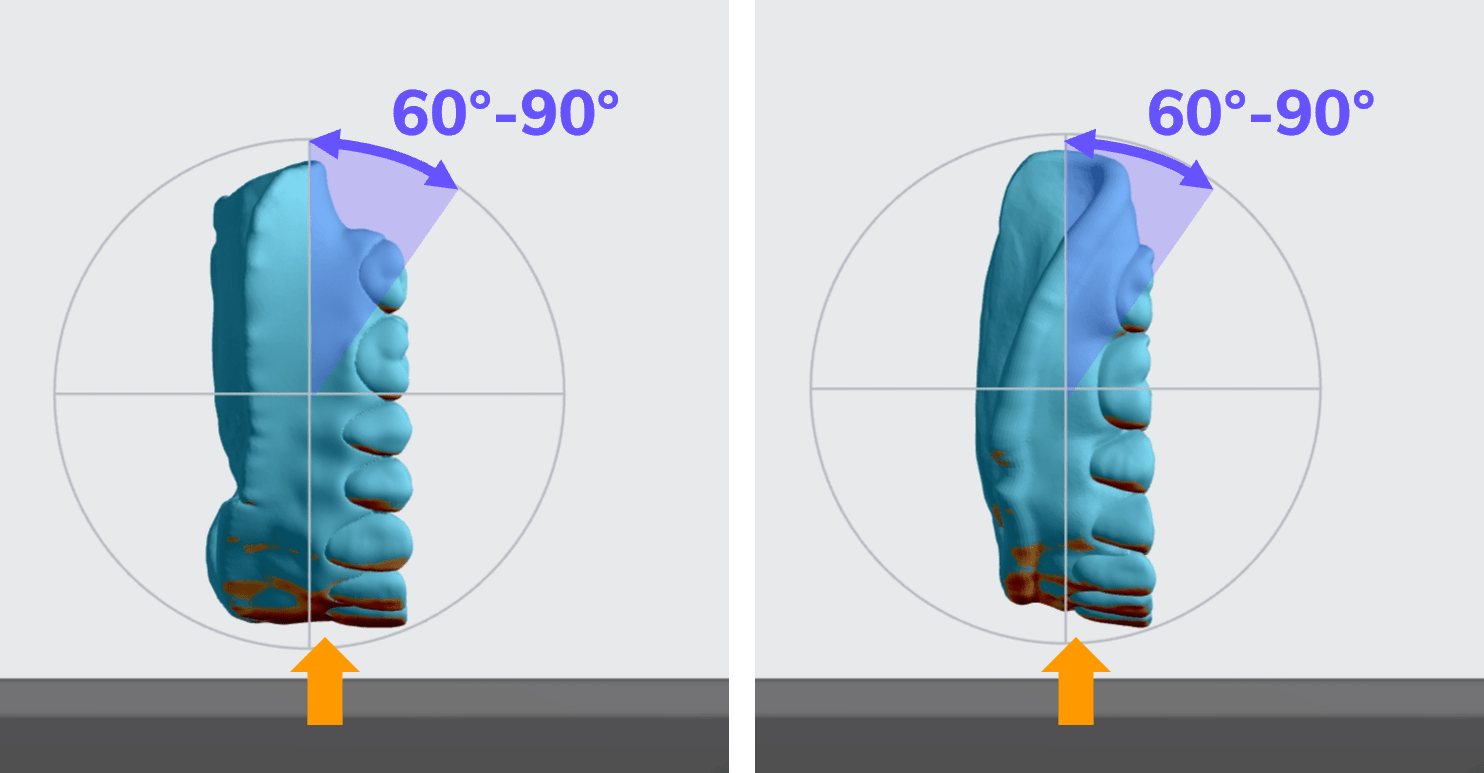
- Rotate try-ins to be **60 - 90 degrees** with the **anterior at the platform.**
- If the try-in is less than 90 degrees from the platform, then orient so the **occlusal side is facing the platform.**
:::hint{type="info"}
Typically, there will be overhangs on molars and labial surfaces.
:::
:::hint{type="warning"}
Surfaces that have overhangs will require supports. These supports affect fit and will require finishing to ensure proper seating.
:::
## Supporting
:::hint{type="info"}
See [Supports](docId\:VUbpoAitbLM11aM9-qJ1p) for detailed information.
:::
::::WorkflowBlock
:::WorkflowBlockItem
Select the [Supports](docId\:VUbpoAitbLM11aM9-qJ1p) tab in the top bar or press **Shift + S.**

:::
:::WorkflowBlockItem
In the bottom bar, toggle [Overhang Detection](docId:1bT3mas8msvxq9CDza67C) **on** and set the angle to **40 - 60 degrees.**
::Image[]{src="https://res.cloudinary.com/carbon3d/image/upload/t_auto_quality_format/v1741914659/Education/Materials/dental/__General_Use/overhang-detection02.gif" size="70" width="712" height="278" position="flex-start" showCaption="false"}
:::
:::WorkflowBlockItem
Also in the bottom bar, set [Toggle Platform](docId:1bT3mas8msvxq9CDza67C) to **off.**
::Image[]{src="https://res.cloudinary.com/carbon3d/image/upload/v1741970064/Education/Materials/dental/__General_Use/toggle-platform02.gif" size="70" width="722" height="347" position="flex-start" showCaption="false"}
:::
:::WorkflowBlockItem
Set **Part Position** to **Above.**
::Image[]{src="https://res.cloudinary.com/carbon3d/image/upload/t_auto_quality_format/v1743201611/Education/Materials/dental/__General_Use/part-position-above.jpg" size="70" width="733" height="146" position="flex-start" showCaption="false"}
:::
:::WorkflowBlockItem
Support overhangs with [fences](docId\:VUbpoAitbLM11aM9-qJ1p) and/or [patches](docId\:VUbpoAitbLM11aM9-qJ1p).
:::
::::
Follow the application specific recommendations below.
- Support all overhangs as needed using the Patch or Fence tools.
- In most cases, Patch is the only tool that will be required.
- When using Patch tool, set **Fence spacing to 2 mm.**
- If redundant bar supports are added, they may be manually deleted.
- Don't forget to support T-bars and the inner edge.
:::hint{type="info"}
The example below shows a lower try-in oriented at 90 degrees (vertical) to the platform.
:::
### Anterior labial surfaces
::embed[]{url="https://player.vimeo.com/video/888827703?dnt=1"}
### T-bars
T-bars also require supports.
- **Use fence supports **to quickly support T-bars.
- Press **ESC **key to end a fence.
::embed[]{url="https://player.vimeo.com/video/889170860?dnt=1"}
### Inner lingual edge of lower try-in
Typically, only a single fence is needed to support the lingual edge.

## Example of well-supported try-ins
::::VerticalSplit{layout="middle"}
:::VerticalSplitItem

:::
:::VerticalSplitItem

:::
::::
# Denture Teeth - Full Arches
:::hint{type="info"}
The following information applies to full arches only.
:::
:::hint{type="info"}
Unlike other applications, denture teeth require placement of supports on **basal surfaces.**
:::
## Orientation
:::hint{type="info"}
For detailed information about orienting parts, read [Orient](docId\:rMnxtq1NIAHXZOc4bZXWu).
:::
- Rotate full arch denture teeth **30 degrees up** with the **posterior at the platform**
- **Occlusal surfaces should face away from the platform.**
::Image[]{src="https://res.cloudinary.com/carbon3d/image/upload/t_auto_quality_format/v1744934443/Education/Materials/dental/Pac-Dent%20Rodin%20Titan/Orient-denture-teeth02-occlusal-away.png" size="50" width="711" height="601" position="flex-start" showCaption="false"}
:::hint{type="info"}
**Surfaces that have overhangs will require supports. ** These supports affect fit and will require finishing to ensure proper seating.
:::
## Supporting
:::hint{type="info"}
See [Supports](docId\:VUbpoAitbLM11aM9-qJ1p) for detailed information.
:::
::::WorkflowBlock
:::WorkflowBlockItem
Select the [Supports](docId\:VUbpoAitbLM11aM9-qJ1p) tab in the top bar or press **Shift + S.**

:::
:::WorkflowBlockItem
In the bottom bar, toggle [Overhang Detection](docId:1bT3mas8msvxq9CDza67C) **on** and set the angle to **40 - 60 degrees.**
::Image[]{src="https://res.cloudinary.com/carbon3d/image/upload/t_auto_quality_format/v1741914659/Education/Materials/dental/__General_Use/overhang-detection02.gif" size="70" width="712" height="278" position="flex-start" showCaption="false"}
:::
:::WorkflowBlockItem
Also in the bottom bar, set [Toggle Platform](docId:1bT3mas8msvxq9CDza67C) to **off.**
::Image[]{src="https://res.cloudinary.com/carbon3d/image/upload/v1741970064/Education/Materials/dental/__General_Use/toggle-platform02.gif" size="70" width="722" height="347" position="flex-start" showCaption="false"}
:::
:::WorkflowBlockItem
Set **Part Position** to **Above.**
::Image[]{src="https://res.cloudinary.com/carbon3d/image/upload/t_auto_quality_format/v1743201611/Education/Materials/dental/__General_Use/part-position-above.jpg" size="70" width="733" height="146" position="flex-start" showCaption="false"}
:::
:::WorkflowBlockItem
Support overhangs with [fences](docId\:VUbpoAitbLM11aM9-qJ1p) and/or [patches](docId\:VUbpoAitbLM11aM9-qJ1p).
- In most cases, Patch is the only tool that will be required.
- Limit supports to **basal surfaces.**
::embed[]{url="https://player.vimeo.com/video/841963636?dnt=1"}
:::
::::
### Example of well-supported full arch

# Nesting
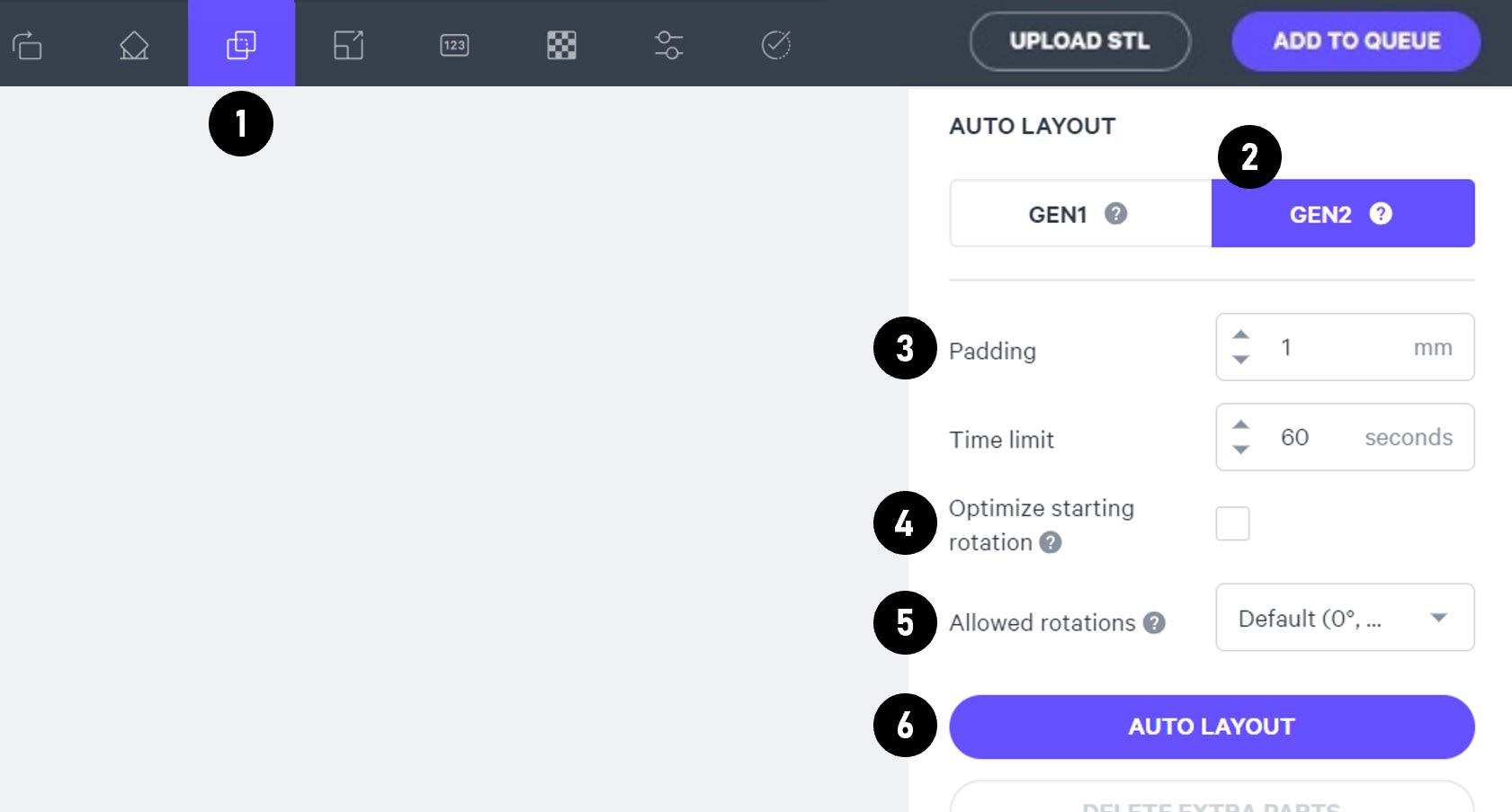
::::WorkflowBlock
:::WorkflowBlockItem
Select the **Layout tab (Shift + L)** in the top menu bar.
:::
:::WorkflowBlockItem
Under **Auto Layout,** select **Gen2.**
Gen2 usually gives the most efficient packing for dental devices.
:::
:::WorkflowBlockItem
Enter at least **1 mm** in **Padding.**
Models require a minimum of 1 mm of space between them.
:::
:::WorkflowBlockItem
Leave **Optimize starting rotation** unchecked.
This leaves your parts in their previous orientations.
:::
:::WorkflowBlockItem
Leave **Allowed rotations** at the default setting.
This gives the software maximum flexibility to fit the most possible parts on the build platform.
:::
:::WorkflowBlockItem
Press the **Auto Layout** button to arrange your parts.
:::
::::
If necessary, nesting can be changed manually:
- Click and drag parts to adjust their position.
- Modify Z rotation by using the **Spin **tool or manual rotations under the **Orient tab** **(Shift + O).**
- Use the [Part List tab](docId:1bT3mas8msvxq9CDza67C)** **as needed to more easily select models and focus on them.
# Print Controls
Click **Print Controls** or **Shift + P** in the top menu bar.

## Slicing
::::VerticalSplit{layout="middle"}
:::VerticalSplitItem
Set Slice Thickness to **Standard (100 µm).**
:::
:::VerticalSplitItem

:::
::::
:::hint{type="warning"}
Reducing the slice thickness by choosing the Fine (50 µm) or Super-fine (25 µm) settings will increase print time and may reduce part quality and accuracy.
:::
## Print Profile
The default [print profile](https://learn.carbon3d.com/software/print-controls#zHtMS) is tuned to optimize accuracy of AOX geometries.
Starting with software v1.46, select the print profile **Pac-Dent Rodin Titan Non-AOX Indications** to reduce print time and maintain accuracy for non-AOX geometries.
# Project Analysis
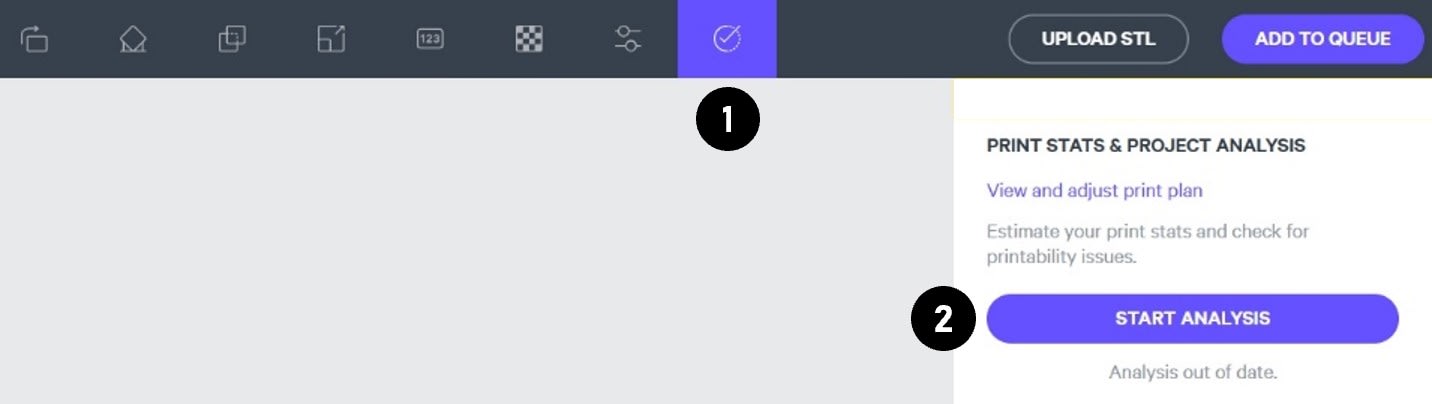
::::WorkflowBlock
:::WorkflowBlockItem
On the top menu bar, select the **Project Analysis tab** (Shift + A).
:::
:::WorkflowBlockItem
Press **Start Analysis.**
:::
:::WorkflowBlockItem
After a short time, the result of the project analysis will be displayed. Note the **print time** and the **required resin volume.**
::Image[]{src="https://res.cloudinary.com/carbon3d/image/upload/t_auto_quality_format/v1742344445/Education/Materials/dental/__General_Use/Analysis-print-time-reqd-resin01.png" size="50" width="842" height="594" position="flex-start" alt="Print Time and Required Resin Volume" showCaption="false"}
:::
:::WorkflowBlockItem
Click **Add to Queue.**

:::
::::
# Printing & Post-Processing
Consult the manufacturer IFU for dispensing, printing, washing, curing, bonding and finishing information.
::::LinkArray{contentSource="CUSTOM"}
:::LinkArrayItem{headerType="IMAGE" headerImage="https://api.archbee.com/api/optimize/3CesIL2dYMCHPZvRjp8S0/cJAKqDDnRUAeJAXNRThMm-20251016-221334.png"}
**[Instructions for Use](https://support.sprintray.com/s/materials/material-usage-documentation)**
:::
::::
## Additional Notes
### Roll Resin Overnight
Carbon recommends **rolling the resin bottle overnight** for the best accuracy of AOX implant holes.
::Image[]{src="https://res.cloudinary.com/carbon3d/image/upload/t_auto_quality_format/v1745347819/Education/Materials/dental/Pac-Dent%20Rodin%20Titan/bottle-roller-no-bottles.jpg" size="50" width="520" height="408" position="flex-start" alt="Automatic resin roller" showCaption="false"}
### Dispensing
Due to the higher viscosity of this resin, **add an additional 200 ml of resin** to the required resin volume provided by the Project Analysis.
### Printing
- On M series printers, using software versions before v1.45 may result in print issues.
- For M3 and M3 Max, there may be false positives for debris detection.
### Mix Resin between Prints
It is strongly recommended to mix resin in the cassette when adding resin between prints. This will help to maintain resolution of AOX implant holes.
# Questions & Support
**For questions about the resin properties, printing, washing or curing your parts, please contact the Rodin support team:**
- Submit support ticket:
For questions about your **Carbon printer** or **Carbon software settings** used for this resin, please [contact Carbon](https://learn.carbon3d.com/carbon-support):
- Email: [support@carbon3d.com](mailto\:support@carbon3d.com)
- Phone:
- **U.S. and Canada** 1-650-285-6307 option 2
- **Germany** +49 6102 5790849
- **UK **+44 (0) 2082 647484
- Printer UI: On the dashboard, select the **Prints** tab. **Select one of the printed projects.** Click **Request Help** in the lower right corner.
::Image[]{src="https://api.archbee.com/api/optimize/3CesIL2dYMCHPZvRjp8S0/YY6yCChSIB8SevmBwY76W_request-help-01.png" size="70" width="6541" height="3371" position="flex-start" alt="Location of button in the printer software" showCaption="false"}